
Artificial intelligence transforms how we build applications. Developers no longer call APIs. They can now let AI models execute structured functions. This tutorial shows how to achieve that with Spring AI.
We will define Java methods, expose them as tools, and connect them to AI models. With function calling, you can get structured responses and automated workflows. The goal is to provide you with a practical guide that you can follow step-by-step.
Why Function Calling Matters
Large language models generate text well. However, text alone is not always valid. You often need structured outputs, such as JSON or database queries. Without structure, automation becomes unreliable.
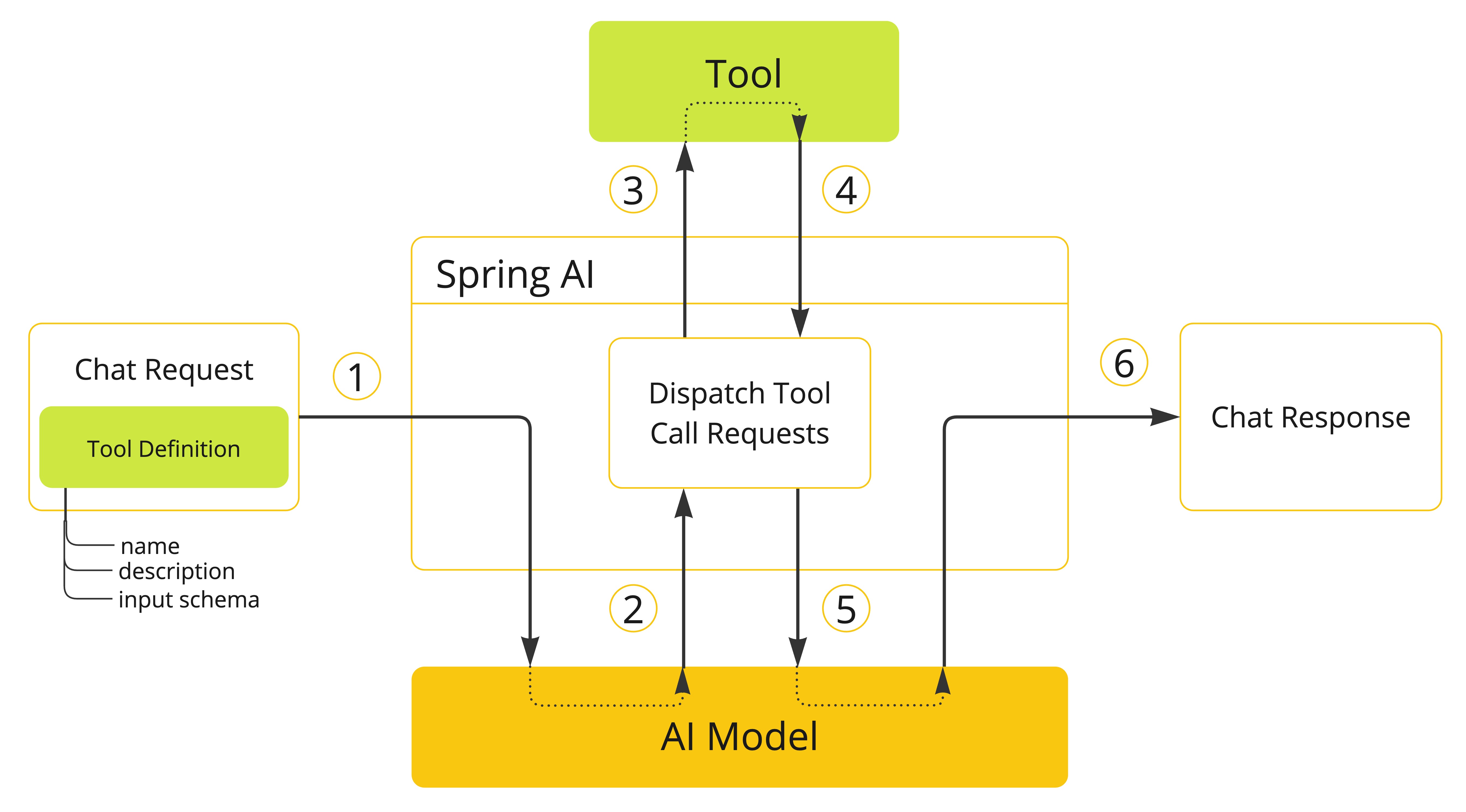
Function calling solves this gap. It lets models choose from predefined methods. The model passes arguments, and your code executes the function. The result can feed back into the model. This cycle produces predictable, reliable workflows.
For example, instead of asking a model to “find the weather in Bangkok,” you define a method getWeather(city). The model detects the intent, calls the method, and provides structured data.
Spring AI simplifies this integration. You stay in the Java ecosystem and use familiar Spring patterns. Let’s explore how it works.


Defining Functions in Java
You expose Java methods as tools. Spring AI uses annotations for this. Consider this example:
import org.springframework.ai.tool.annotation.Tool;

@Component
public class WeatherService {

    @Tool
    public String getWeather(String city) {
        return "The weather in " + city + " is sunny with 32°C.";
    }
}
Here, the @Tool annotation marks getWeather as callable by the model. The signature defines parameters. Spring AI builds the schema automatically.
When the model sees user input, it may decide to call getWeather. Your method executes, and the AI returns the structured response.
Invoking Tools from the Model
Let’s see how to trigger the model with function calling. You create a simple controller:
import org.springframework.web.bind.annotation.*;
import org.springframework.ai.client.*;

@RestController
@RequestMapping("/ai")
public class AIController {

    private final ChatClient chatClient;

    public AIController(ChatClient.Builder chatClientBuilder) {
        this.chatClient = chatClientBuilder.build();
    }

    @PostMapping("/chat")
    public String chat(@RequestBody String message) {
        return chatClient.prompt(message)
                .tools(new WeatherService())
                .call()
                .content();
    }
}
When a user sends What is the weather in Bangkok?, the model chooses the getWeather tool. The service runs, and the response gets returned.
This creates structured, predictable AI-powered workflows.
Returning Structured Responses
You can improve workflows by returning structured JSON. Instead of plain strings, define response objects:
public record WeatherResponse(String city, String condition, int temperature) { }
Modify the method:
//WeatherService.java
@Tool(description = "Get current weather information for a specific location")
public WeatherResponse getWeather(String city) {
    return new WeatherResponse(city, "Sunny", 32);
}
Now, the AI model integrates structured data with natural language. This structure is crucial for downstream systems.
Launch an application
http://localhost:8080/ai/chat
What's the weather like in Bangkok?

Chaining Multiple Tools
Function calling becomes powerful when chaining methods. Imagine combining weather data with currency exchange rates.
@Tool(description = "currency exchange rates")
public String convertCurrency(String from, String to, double amount) {
    return amount + " " + from + " equals " + (amount * 35.0) + " " + to;
}
The model can decide whether to call getWeather, convertCurrency, or both. For instance:
- User: “What’s the weather in Bangkok and the cost of $100 in THB?”
- Model: Calls
getWeather("Bangkok")andconvertCurrency("USD", "THB", 100).
This chaining enables automated decision-making.
Modify the method:
//AIController.java
@PostMapping("/chat")
public String chat(@RequestBody String message) {
    return chatClient.prompt(message)
            .tools(new WeatherService(), new CurrencyService())
            .call()
            .content();
}
Test an application
http://localhost:8080/ai/chat
What's the weather in Bangkok and the cost of $100 in THB?

Best Practices for Function Calling
When exposing functions, follow best practices:
- Keep methods simple. Complex signatures confuse the model.
- Use clear names. Descriptive function names improve detection.
- Return structured data. JSON-like objects are better than strings.
- Secure sensitive functions. Do not expose methods that alter databases directly.
- Test with diverse prompts. Ensure the model calls the right tool.
These practices improve reliability and trust in your AI applications.
Automating Workflows with AI and Tools
Beyond simple queries, you can automate entire workflows. Suppose you build a travel assistant. Functions may include:
getWeather(city)findFlights(origin, destination)recommendHotels(city)
A user might ask: “Plan a weekend trip to Chiang Mai. Include weather, flights, and hotels.”
The model orchestrates multiple function calls. It fetches weather, retrieves flights, and suggests hotels. You get a structured plan, ready for user interaction.
This automation demonstrates the real power of Spring AI.
Debugging Function Calls
You may need to debug why a model chooses certain functions. Spring AI provides logs showing function schemas and calls. Enable debugging in application.yml:
logging:
  level:
    org.springframework.ai: DEBUG
Check the logs to see which tool was selected and with what arguments. Adjust your tool names and descriptions if the AI struggles.
Debugging ensures your functions remain predictable and accurate.
Extending Functionality with External APIs
Your Java methods can call external services. For example, getWeather could query a real weather API:
I use the free weather API from Open Meteo.
//CurrentWeather.java
import com.google.gson.annotations.SerializedName;
public class CurrentWeather {
    @SerializedName("temperature_2m")
    private double temperature;

    public double getTemperature() {
        return temperature;
    }
}
//WeatherForecast.java
import com.google.gson.annotations.SerializedName;
public class WeatherForecast {
    @SerializedName("current")
    private CurrentWeather current;

    public CurrentWeather getCurrent() {
        return current;
    }
}
//WeatherService.java
@Component
@Slf4j
public class WeatherService {

    private final WebClient webClient;

    public WeatherService(WebClient.Builder webClientBuilder) {
        this.webClient = webClientBuilder.baseUrl("https://api.open-meteo.com").build();
    }

    @Tool(description = "Get current weather information for a specific location")
      public Double getWeatherData(BigDecimal latitude, BigDecimal longitude) {
          log.info("API calling");

          Mono<String> body = webClient.get()
                  .uri(uriBuilder -> uriBuilder
                          .path("/v1/forecast")
                          .queryParam("latitude", latitude)
                          .queryParam("longitude", longitude)
                          .queryParam("current", "temperature_2m,wind_speed_10m")
                          .queryParam("hourly", "temperature_2m,relative_humidity_2m,wind_speed_10m")
                          .build())
                  .retrieve()
                  .bodyToMono(String.class);

          // Convert the JSON string to a WeatherForecast object
          Gson gson = new Gson();
          WeatherForecast forecast = gson.fromJson(body.block(), WeatherForecast.class);

          // Access the nested temperature data
          if (forecast != null) {
              double currentTemperature = forecast.getCurrent().getTemperature();
              log.info("currentTemperature {}", currentTemperature);
              return currentTemperature;
          }else{
              return null;
          }

      }
}
//AIController.java
import org.springframework.ai.chat.client.ChatClient;
import org.springframework.web.bind.annotation.*;

@RestController
@RequestMapping("/ai")
public class AIController {

    private final ChatClient chatClient;
    private final WeatherService weatherService;
    private final CurrencyService currencyService;

    public AIController(ChatClient.Builder chatClientBuilder, WeatherService weatherService, CurrencyService currencyService) {
        this.chatClient = chatClientBuilder.build();
        this.weatherService = weatherService;
        this.currencyService = currencyService;
    }

    @PostMapping("/chat")
    public String chat(@RequestBody String message) {
        return chatClient.prompt(message)
                .tools(weatherService, currencyService)
                .call()
                .content();
    }
}
This turns AI from a text generator into a real-world orchestrator. With Spring AI, integration feels natural and consistent with existing Spring Boot practices. You can put a logger to check your AI call an API.
Test an application
http://localhost:8080/ai/chat
What's the weather in Latitude 13.736717 and Longitude 100.523186?
In console
c.e.s.service.tools.WeatherService       : API calling
c.e.s.service.tools.WeatherService       : currentTemperature 29.7

Security Considerations
Exposing tools to AI requires careful thought. Do not allow the model to perform destructive actions without safeguards.
For instance, avoid direct database updates. Instead, expose safe query methods. Add validation and permission checks inside your services.
Security becomes even more critical when chaining tools. Ensure every method has proper controls. Transparency builds trust in AI-driven systems.
Real-World Use Cases
Function calling with Spring AI applies across industries:
- Banking: Expose functions for balance checks, loan calculators, and branch locators.
- Healthcare: Provide appointment scheduling and prescription reminders.
- E-commerce: Enable product searches, price comparisons, and shipping updates.
- Communication: Build assistants that schedule meetings or summarize calls.
Each use case benefits from structured outputs. You get predictable workflows instead of vague text.
Performance Considerations
Every function call adds latency. Optimize your methods to respond quickly if your tool calls external APIs, and cache frequent responses.
Batch operations when possible. Instead of multiple small calls, design one function to return a larger payload.
Measure and profile performance regularly. Users expect instant responses from AI assistants.
Finally
Function calling with Spring AI bridges the gap between natural language and structured automation. It lets developers expose Java methods as tools and connect them with AI models.
The result is reliable, predictable, and helpful workflows. You no longer rely on unstructured text. Instead, you integrate models directly with business logic.
With Spring AI, function calling feels like writing standard Spring Boot code. The learning curve is low, and the potential impact is vast.
Now, start building your own assistants. Define your tools. Register them. Let the AI orchestrate workflows. Watch your applications become more intelligent and more automated.


