Java is one of the most popular programming languages in the world, known for its platform independence, robustness, and simplicity. At the heart of Java programming lies the concept of variables, which serve as the building blocks for storing and managing data. This beginner-friendly guide will take developers through the fundamentals of Java variables, their types, and best practices for using them effectively.
What Are Variables in Java?
In Java, a variable is a container that holds data that can be used and manipulated during program execution. Consider it a labeled storage box where developers can store and retrieve values. Each variable has three main components:
- Type: Determines the data the variable can hold (e.g., integers, decimals, characters).
- Name: A unique identifier to access the stored value.
- Value: The actual data stored in the variable.
Declaring Variables
In Java, a variable must be declared before it can be used. A declaration involves specifying the variable’s type and name.
int age;
Here:
intis the data type, which specifies that the variableagewill store integers.ageis the name of the variable.
Developers can also initialize a variable (assign a value) during declaration:
int age = 25;
Java Variable Types
Java provides various variable types to accommodate different kinds of data. These can be broadly categorized into primitive types and reference types.
1. Primitive Data Types
Primitive data types are the most basic types of variables. Java has eight primitive data types:
- byte: Stores integers from -128 to 127 (1 byte).
- short: Stores integers from -32,768 to 32,767 (2 bytes).
- int: Stores integers from -2,147,483,648 to 2,147,483,647 (4 bytes).
- long: Stores large integers (8 bytes).
- float: Stores decimal numbers with single precision (4 bytes).
- double: Stores decimal numbers with double precision (8 bytes).
- char: Stores a single 16-bit Unicode character (2 bytes).
- boolean: Stores only two values:
trueorfalse.
byte smallNumber = 100;
int number = 12345;
float price = 45.67f;
char grade = 'A';
boolean isAvailable = true;
2. Reference Data Types
Reference types are used for objects and arrays. Unlike primitive types, they store references (memory addresses) rather than actual data. Standard reference types include:
- String: Represents a sequence of characters.
- Arrays: Store multiple values of the same type.
- Objects: Instances of user-defined or built-in classes.
Example:
String name = "Alice";
int[] numbers = {1, 2, 3, 4, 5};
Variable Scope in Java
Variable scope defines the region of a program where a variable can be accessed and used. Java has three main types of variable scopes:
1. Local Variables
Local variables are declared inside a method, a constructor, or a block. They are only accessible within that scope and are destroyed once the method exits.
void display() {
    int localVar = 10; // Local variable
    System.out.println(localVar);
}
2. Instance Variables
Instance variables are declared within a class but outside any method or block. Each object of the class has its own copy of these variables. They are initialized to default values if not explicitly assigned.
class Student {
    String name; // Instance variable
    int age;
}
3. Static Variables
Static variables are shared among all instances of a class. They are declared using the static keyword and belong to the class rather than any specific instance.
class Employee {
    static int companyCode = 123; // Static variable
}
Variable Naming Conventions
To ensure clarity and maintainability, follow these best practices when naming variables:
1. Descriptive Names
Use names that clearly describe the purpose of the variable.
int numberOfStudents;
double averageScore;
2. Camel Case
Start with a lowercase letter and capitalize the first letter of subsequent words.
boolean isAvailable;
3. Avoid Reserved Keywords
Developers cannot use Java keywords like int, class, or static as variable names.
4. No Special Characters
Avoid using special characters except $ and _.
5. Consistency
Stick to a consistent naming style throughout your codebase.
Conclusion
It is an important rule. Adhering to these conventions ensures the developer’s code is professional, readable, and easy to maintain.
Default Values
Java automatically initializes variables to default values based on their types:
- Numeric types (
byte,short,int,long,float,double):0 char:\u0000(null character)boolean:false- Reference types:
null
However, local variables must be explicitly initialized before they are used.
Constants in Java
If developers want a variable’s value to remain constant, use the final keyword. Constants are typically written in uppercase letters with underscores separating words.
final double PI = 3.14159;
Type Conversion and Casting
Java supports type conversion between compatible types. It can be:
1. Implicit (Widening)
Automatically converts smaller types to larger types.
int num = 100;
double dbl = num; // Implicit conversion
2. Explicit (Narrowing)
Converts larger types to smaller types explicitly using casting.
double price = 45.99;
int roundedPrice = (int) price; // Explicit casting
Reference Type Casting:
- Converts an object to its subtype or supertype.
- Requires explicit casting and may throw a
ExceptionIf incompatible.
double val = 5.7;
int num = (int) val; // Warning: Loss of precision

Object obj = "Hello";
String str = (String) obj; // Safe cast
Integer num = (Integer) obj; // Unsafe, causes ClassCastException

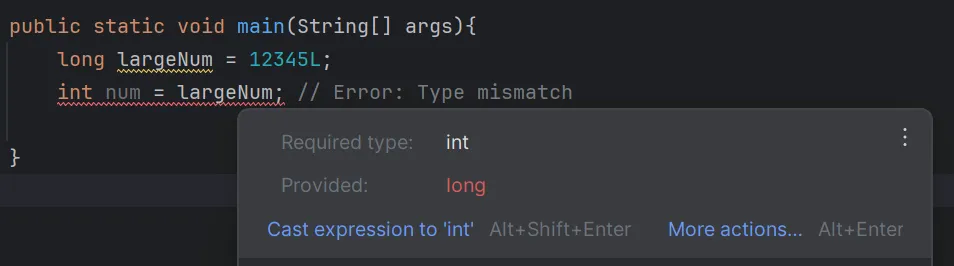
long largeNum = 12345L;
int num = largeNum; // Error: Type mismatch

Object obj = new String("Java");
Integer num = (Integer) obj; // Runtime Exception

List rawList = new ArrayList();
List<String> stringList = (List<String>) rawList; // Unchecked cast warning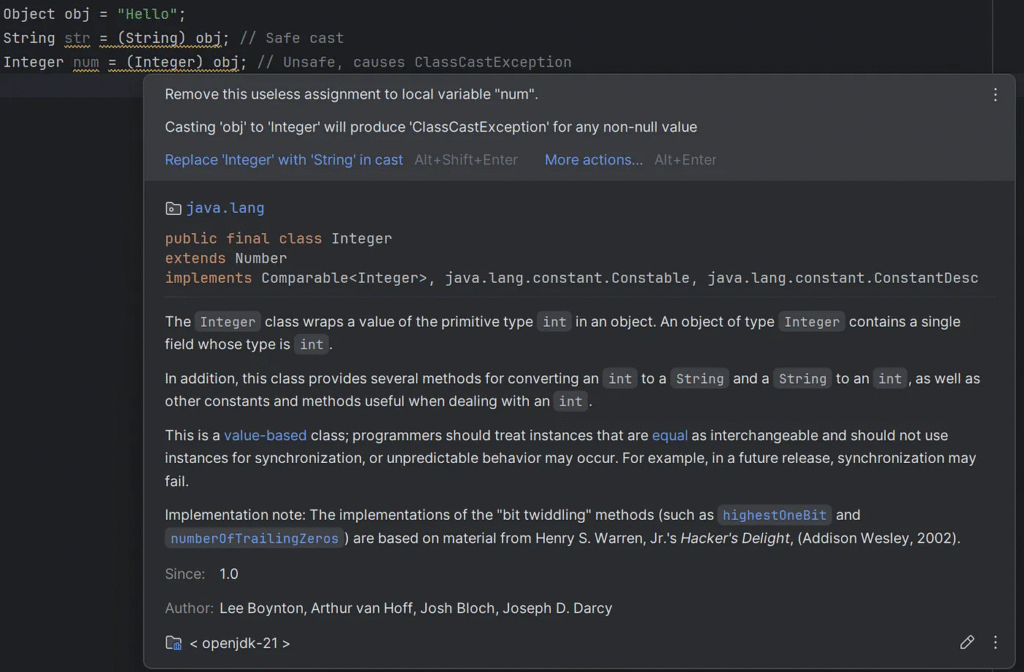
Examples of Safe Practices.
public class TypeCastingExample {
    public static void main(String[] args) {
        // Widening (Safe)
        int num = 100;
        double largeNum = num; // Implicit conversion

        // Narrowing (Explicit)
        double val = 99.99;
        int smallNum = (int) val; // Truncates decimal (smallNum = 99)

        // Safe Reference Casting
        Object obj = "Hello";
        if (obj instanceof String) {
            String str = (String) obj; // Safe cast
            System.out.println(str);
        } else {
            System.out.println("Not a string");
        }

        // Avoid ClassCastException
        Object obj2 = 42;
        if (obj2 instanceof String) {
            String str2 = (String) obj2; // Prevents runtime exception
        } else {
            System.out.println("obj2 is not a string");
        }
    }
}
Common Errors with Variables
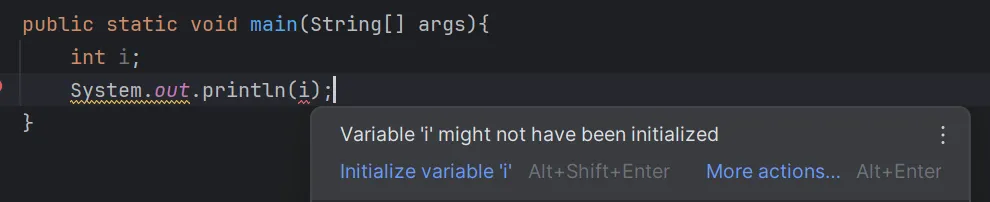
1. Using Uninitialized Local Variables
Java does not automatically initialize local variables; therefore, using them before assignment results in a compilation error.
int number;
System.out.println(number); // Error: variable number might not have been initialized
2. Type Mismatch
Assigning a value of an incompatible type to a variable will result in an error.
int age = "twenty"; // Error: incompatible types
3. Variable Shadowing
Defining a local variable with the same name as an instance variable can lead to confusion.
class Test {
    int number = 10;

    void display() {
        int number = 20; // Shadows instance variable
        System.out.println(number); // Prints 20
    }
}
Using IntelliJ IDEA to check for errors related to variables is a great way to ensure your Java code is clean, efficient, and bug-free. IntelliJ provides real-time error detection and suggestions for fixing common variable-related issues.

IntelliJ IDEA – the IDE for Pro Java and Kotlin Development
Alternative IDE
- Eclipse, Versatility, and large projects.
- NetBeans, Beginners, and smaller projects.

Eclipse Downloads | The Eclipse Foundation

Welcome to Apache NetBeans
What is the difference between primitive data types and wrapper classes
In Java, the primary difference between int and Integer (or double and Double) lies in the fact that int and double are primitive data types, while Integer and Double does the Java standard library in the provided wrapper classes java.lang package.
Primitive
- Type: Primitive
- Nullability: Not allowed
- Memory Usage: Efficient
- Performance: Faster than wrapper classes
- Methods: None
- Collections: Not allowed
- Default Value:
0forint,0.0fordouble
Wrapper
- Type: Object
- Nullability: Can be
null - Memory Usage: Higher
- Performance: Slower than primitive
- Methods: Provides utility methods
- Collections: Allowed
- Default Value:
nullif uninitialized
Example
import java.util.ArrayList;
import java.util.List;

public class Example {
    public static void main(String[] args) {
        // Primitive type
        int a = 10;
        int b = 20;
        int sum = a + b;
        System.out.println("Sum (Primitive): " + sum); // 30

        // Wrapper type
        Integer x = 15; // Autoboxing
        Integer y = null; // Wrapper allows null
        Integer total = x + (y == null ? 0 : y); // Handle null safely
        System.out.println("Total (Wrapper): " + total); // 15

        // Using wrappers with collections
        List<Integer> numbers = new ArrayList<>();
        numbers.add(5); // Autoboxing: int -> Integer
        numbers.add(null); // Wrapper allows null
        System.out.println("Numbers: " + numbers);
    }
}
Best Practices for Variable Usage
1. Minimize Scope
Declare variables in the narrowest possible scope to reduce errors and enhance readability.
2. Avoid Magic Numbers
Use constants instead of hardcoding values
final int MAX_RETRY = 5;
3. Initialize Variables
Assign meaningful initial values to variables to prevent unexpected behavior.
4. Use Comments Sparingly
Ensure variable names are self-explanatory to reduce the need for excessive comments.
Conclusion
While variables may seem basic, they form the foundation for every Java application. Mastery of variables ensures cleaner code, better performance, easier debugging, and readiness to tackle advanced Java features and architectures. Developers who invest time in understanding variables deeply are better equipped to handle the complexities of real-world software development.
This article was originally published on Medium.