Data validation helps screen out invalid client data and makes the code easier to maintain. Jakarta validation provides various annotations for validating data, such as NotEmpty or Digits. These annotations provide flexible parameters for custom messages. The developer can create custom validation annotations for implementation with Jakarta validation.
Scenario
The developer team creates RESTful web services for creating user profiles.
Discussion
The developer team decided to use Jakarta validation to check screen data from the request body and prevent invalid data, such as invalid email patterns or empty required fields.
Implementation
The developer team created RESTful Web Services using Spring Boot 3 and integrated them with Java data validation.
Testing
The developer team can test RESTful Web Services using Spring Boot 3 with Postman.

Postman: The World’s Leading API Platform | Sign Up for Free
Spring Boot validation maven dependency.
<dependency>
    <groupId>org.springframework.boot</groupId>
    <artifactId>spring-boot-starter-validation</artifactId>
</dependency>
Create RESTful Web Services using Spring Boot.
1. Create a controller class UserProfilesController.
import com.example.demo.bean.UserProfileBean;
import jakarta.validation.Valid;
import org.springframework.http.HttpStatus;
import org.springframework.http.ResponseEntity;
import org.springframework.web.bind.annotation.PostMapping;
import org.springframework.web.bind.annotation.RequestBody;
import org.springframework.web.bind.annotation.RestController;

@RestController
public class UserProfilesController {
    @PostMapping(path = "/user-profiles", produces = "application/json")
    public ResponseEntity<String> create(@Valid @RequestBody UserProfileBean userProfile) {
        //custom process
        return new ResponseEntity<>("created", HttpStatus.CREATED);
    }

}
Valid annotation is for this method using Java data validation.
RequestBody annotation using UserProfileBean as a request body.
2. Create a Java bean for the request body.
import com.example.demo.validator.PersonIdValidate;
import jakarta.validation.constraints.Email;
import jakarta.validation.constraints.Min;
import jakarta.validation.constraints.NotEmpty;
import lombok.Data;
import lombok.Getter;
import lombok.Setter;

@Getter
@Setter
@Data
public class UserProfileBean {

    @PersonIdValidate
    private String personalId;

    @NotEmpty
    private String firstName;

    @NotEmpty
    private String lastName;

    @Email
    private String email;

    @Min(0)
    private long age;

    public UserProfileBean(String personalId, String firstName, String lastName, int age, String email){
        this.personalId = personalId;
        this.firstName = firstName;
        this.lastName = lastName;
        this.email =  email;
        this.age = age;
    }
}
This class contains Java data validation to screen out invalid data from clients. PersonIdValidate annotation is a custom validation.
3. Create custom validation for validating personal ID.
import jakarta.validation.ConstraintValidator;
import jakarta.validation.ConstraintValidatorContext;
class PersonIdValidator implements ConstraintValidator<PersonIdValidate, String> {

    @Override
    public boolean isValid(String value, ConstraintValidatorContext context) {
        return validatePersonId(value);
    }

    public boolean validatePersonId(String pid) {
        //custom validation personal ID
        return !pid.isEmpty();
    }
}
import jakarta.validation.Constraint;
import jakarta.validation.Payload;
import java.lang.annotation.Documented;
import java.lang.annotation.Retention;
import java.lang.annotation.Target;
import static java.lang.annotation.ElementType.FIELD;
import static java.lang.annotation.RetentionPolicy.RUNTIME;
@Target({ FIELD })
@Retention(RUNTIME)
@Constraint(validatedBy = PersonIdValidator.class)
@Documented
public @interface PersonIdValidate {
String message() default "invalid personal ID or personal ID is empty.";
Class<?>[] groups() default { };
Class<? extends Payload>[] payload() default { };
}4. Create an exception handler for MethodArgumentNotValidException
import com.example.demo.bean.CommonResponseBean;
import com.example.demo.bean.ErrorBean;
import org.springframework.http.HttpStatus;
import org.springframework.http.ResponseEntity;
import org.springframework.web.bind.MethodArgumentNotValidException;
import org.springframework.web.bind.annotation.ExceptionHandler;
import org.springframework.web.bind.annotation.ResponseStatus;
import org.springframework.web.bind.annotation.RestControllerAdvice;
import java.util.ArrayList;
import java.util.Date;

@RestControllerAdvice
public class CommonExceptionHandlers  {

    @ExceptionHandler(MethodArgumentNotValidException.class)
    @ResponseStatus(HttpStatus.BAD_REQUEST)
    public ResponseEntity<CommonResponseBean> handleMethodArgumentNotValidException(MethodArgumentNotValidException ex) {
        // Customize the response entity
        CommonResponseBean res = new CommonResponseBean();
        res.setTimestamp(new Date().getTime());
        res.setErrors(new ArrayList<>());
        res.getErrors().add(new ErrorBean("E0002",ex.getMessage()));
        return ResponseEntity.status(HttpStatus.BAD_REQUEST).body(res);
    }
}
Test case scenario
1. Test case: Send a request to path /user-profiles.
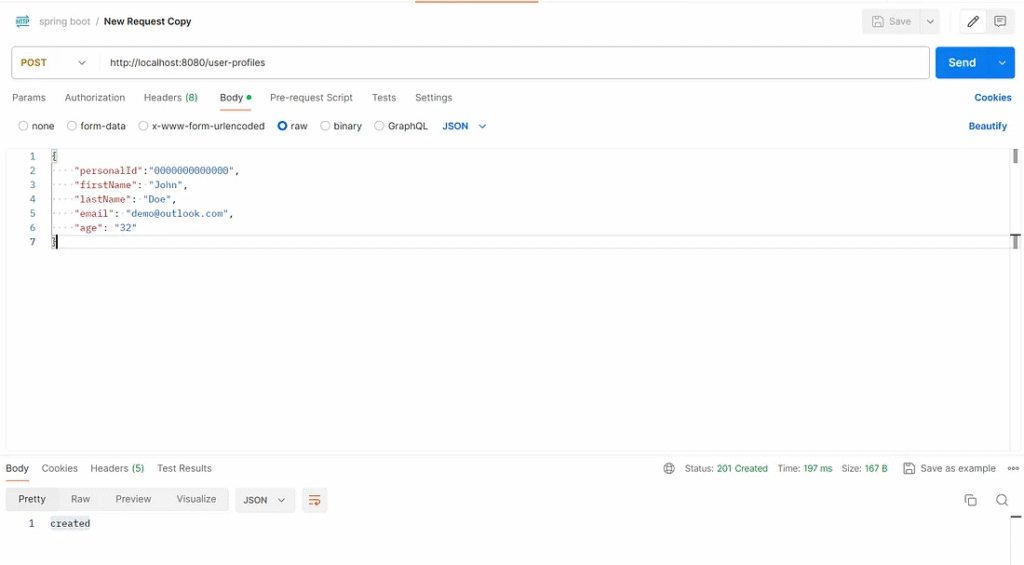
Test result: web services response HTTP status 201 and request body “created”.
2. Test case: Send a request to path /user-profiles with an empty personal ID.
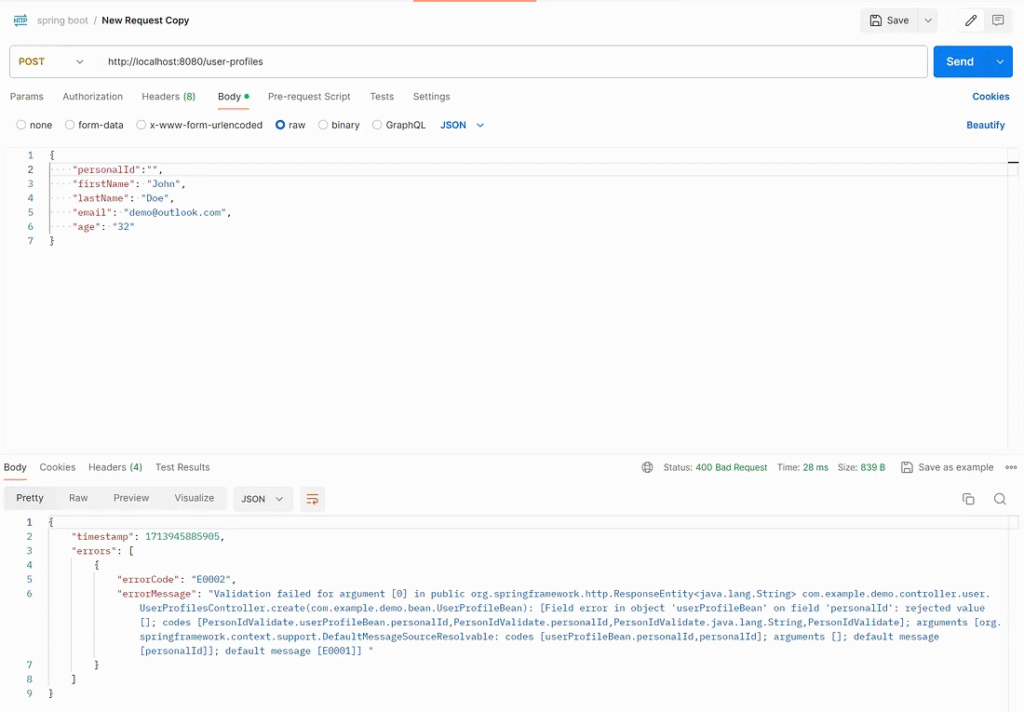
Test result: Web services respond to HTTP status 400 and request body with error information, not an empty personal ID.
3. Test case: Send a request to path /user-profiles with an empty first name.
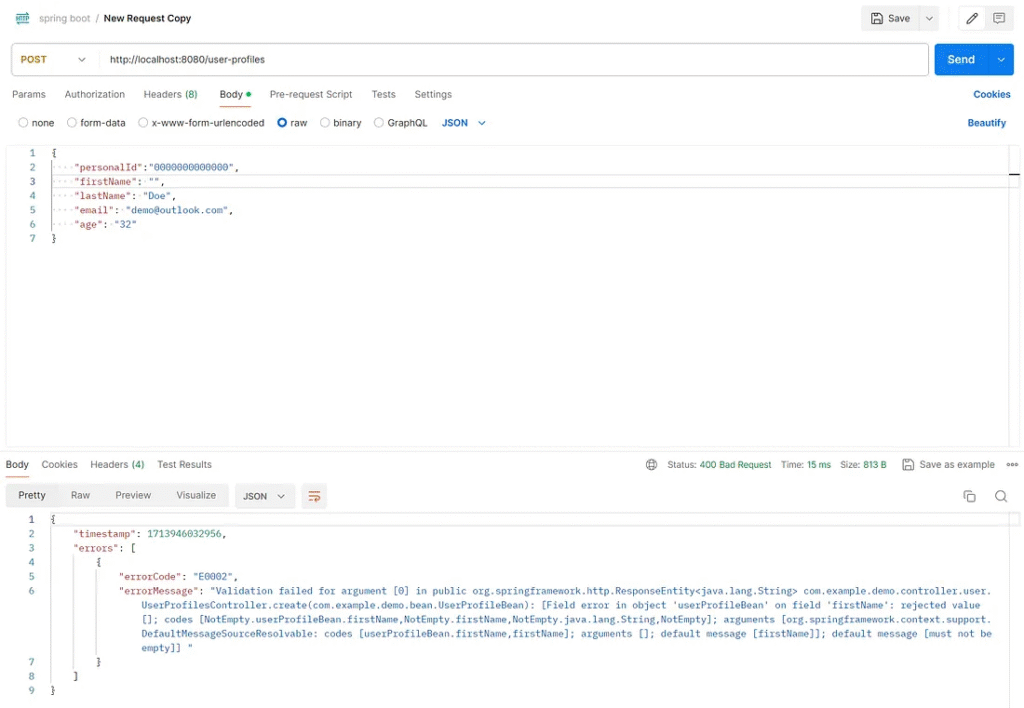
Test result: Web services respond to HTTP status 400 and request body with error information, not an empty first name.
4. Test case: Send a request to path /user-profiles with an invalid email pattern.
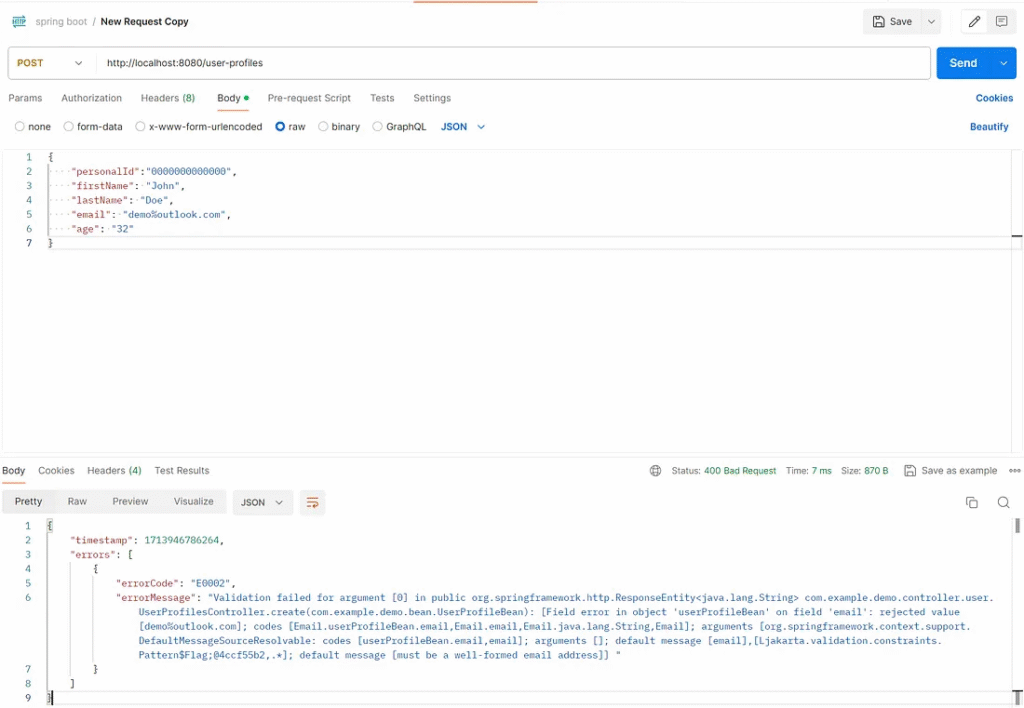
Test result: Web services respond to an HTTP status 400 with an error message and an invalid email in the request body.
The error message from “MethodArgumentNotValidException” is complex for the client to read. The developer must customize the message error from “MethodArgumentNotValidException” in the exception handler class.
Custom an error message from “MethodArgumentNotValidException.”
The developer can customize the rest of the controller advice annotation in the CommonExceptionHandlers class.
@RestControllerAdvice
public class CommonExceptionHandlers {

    @ExceptionHandler(MethodArgumentNotValidException.class)
    @ResponseStatus(HttpStatus.BAD_REQUEST)
    public ResponseEntity<CommonResponseBean> methodArgumentNotValidException(MethodArgumentNotValidException ex) {
        List<ErrorBean> message = new ArrayList<>();
        // Get field name
        ex.getFieldErrors().forEach(error -> {
                    if (null == error.getDefaultMessage()) return;
                    message.add(new ErrorBean("E0001",error.getField() +", "+ error.getDefaultMessage()));
                }
        );
        CommonResponseBean res = new CommonResponseBean();
        res.setTimestamp(new Date().getTime());
        res.setErrors(message);
        return new ResponseEntity<>(res, HttpStatus.BAD_REQUEST);
    }
}
The developer can create a custom message by reading each error message in the MethodArgumentNotValidException class and adding it to the list of error beans. Each validation can have multiple fields. Java data validation screens data in all fields in the process.
Custom error message Java data validation in UserProfileBean
The developer can use the default error message from Java data validation or a custom error message. This custom can integrate with message properties to support multiple languages.
@Getter
@Setter
public class UserProfileBean {

    @PersonIdValidate
    private String personalId;

    @NotEmpty(message = "This is a custom message.")
    private String firstName;

    @NotEmpty
    private String lastName;

    @Email
    private String email;

    @Min(0)
    private long age;

    public UserProfileBean(String personalId, String firstName, String lastName, int age, String email){
        this.personalId = personalId;
        this.firstName = firstName;
        this.lastName = lastName;
        this.email =  email;
        this.age = age;
    }
}
Test case scenario
1. Test case: Send a request to path /user profiles with an empty personal ID, first name, and an invalid email pattern.
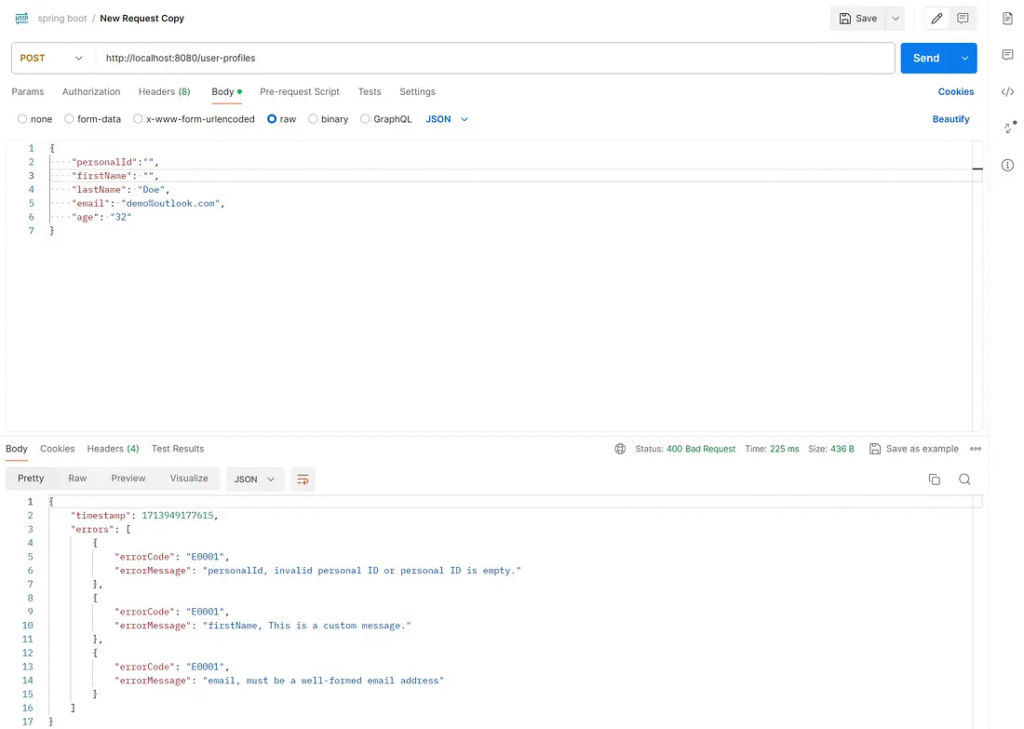
Test result: Web services respond to HTTP status 400 and request body with multiple field error messages.
Custom error messages support multiple languages.
The developer can customize the error message to support multiple languages by following this step.
1. Create messages_fr.properties to support the French language.
not.empty=pas vide
2. Create messages_ja.properties to support the Japanese language.
not.empty=空ではない
3. Create MessageUtils to manipulate message codes from the error messages.
import org.springframework.beans.factory.annotation.Autowired;
import org.springframework.context.MessageSource;
import org.springframework.stereotype.Component;

import java.util.Locale;

@Component
public class MessageUtils {

    private final MessageSource messageSource;

    public MessageUtils(MessageSource messageSource) {
        this.messageSource = messageSource;
    }

    public String getMessage(String code, Object[] args, Locale locale) {
        return messageSource.getMessage(code, args, locale);
    }
}
Modify the CommonExceptionHandlers class to support accepting language from the request header and get messages from the message code.
@RestControllerAdvice
public class CommonExceptionHandlers {

    private final MessageUtils messageUtils;

    private Locale locale;

    @Autowired
    public CommonExceptionHandlers(MessageUtils messageUtils) {
        this.messageUtils = messageUtils;
    }

    @ModelAttribute
    public void addAcceptLanguageHeader(@RequestHeader("Accept-Language") String acceptLanguage, HttpServletRequest request) {
        // Parse the Accept-Language header to get the preferred locale
        this.locale =  Locale.lookup(Locale.LanguageRange.parse(acceptLanguage),Arrays.asList(Locale.FRENCH, Locale.JAPANESE, Locale.getDefault()));
    }


    @ExceptionHandler(MethodArgumentNotValidException.class)
    @ResponseStatus(HttpStatus.BAD_REQUEST)
    public ResponseEntity<CommonResponseBean> methodArgumentNotValidException(MethodArgumentNotValidException ex) {
        List<ErrorBean> message = new ArrayList<>();
        // Get field name
        ex.getFieldErrors().forEach(error -> {
                    if (null == error.getDefaultMessage()) return;
                    message.add(new ErrorBean("E0001", error.getField() + ", " + messageUtils.getMessage(error.getDefaultMessage(), new Object[]{}, locale)));
                }
        );
        CommonResponseBean res = new CommonResponseBean();
        res.setTimestamp(new Date().getTime());
        res.setErrors(message);
        return new ResponseEntity<>(res, HttpStatus.BAD_REQUEST);
    }
}
Test case scenario
1. Test case: Send a request to path /user-profiles with an empty first name and accept-language header value “fr-FR”.
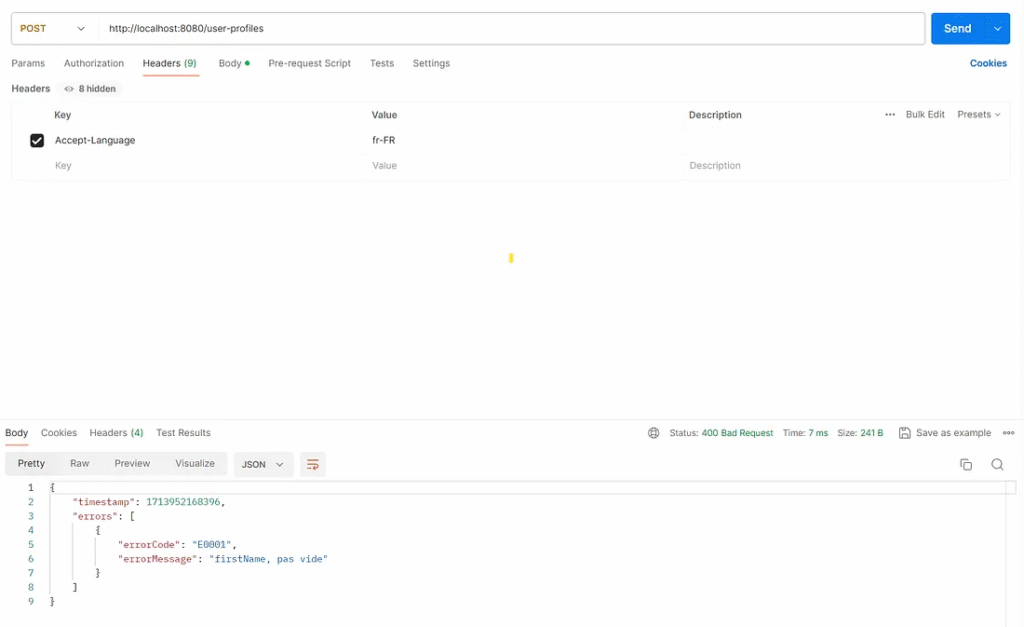
Test result: Web services respond to HTTP status 400 and the request body with error messages in French.
2. Test case: Send a request to path /user profiles with an empty first name and the accept-language header value “ja-JP.”
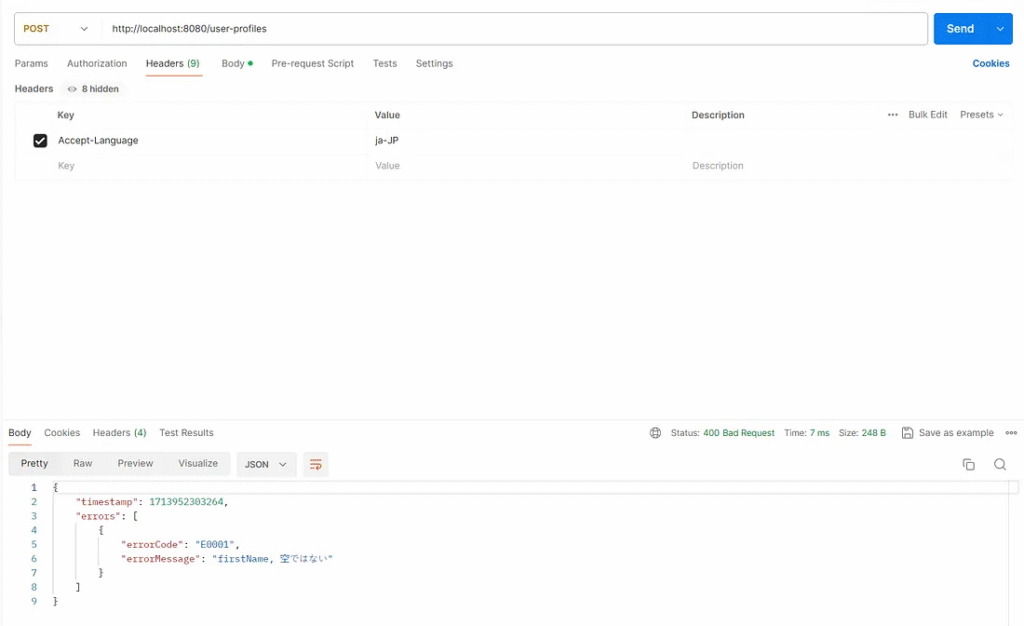
Test result: Web services respond to HTTP status 400 and the request body with error messages in Japanese.
Finally
The developer should be aware of all annotations provided by Java data validation to prevent wasting time creating custom validation that is redundant with those already offered by Java.
Overview (Jakarta Bean Validation API 3.0.0)
This article was originally published on Medium.