Maps in Java are powerful tools. They allow developers to store and retrieve key-value pairs efficiently. Learning about Maps is essential if you’re new to Java or exploring its Collections Framework. In this Java tutorial map, we’ll cover everything from basic concepts to advanced techniques.
What Is a Map in Java?
In Java, a Map is an object that stores data in key-value pairs. It does not allow duplicate keys. However, values can repeat. You can use a Map to link a unique identifier (key) to an associated value. The Map interface is part of the java.util package.
Java offers several Map implementations, including:
HashMapLinkedHashMapTreeMapHashtableConcurrentHashMap
Each has its own strengths and ideal use cases.
Why Use a Map?
Maps make your programs cleaner and more efficient. Here are the key reasons to use them:
- Fast data retrieval using keys
- Flexible data storage
- Easy lookup without looping through lists
In short, Maps are optimized for search-heavy operations.
Getting Started With HashMap
The most commonly used Map in Java is HashMap. It stores elements in an unordered manner and allows one null key and multiple null values.
import java.util.HashMap;

public class Example {
    public static void main(String[] args) {
        HashMap<String, Integer> ageMap = new HashMap<>();
        ageMap.put("Alice", 30);
        ageMap.put("Bob", 25);

        System.out.println(ageMap.get("Alice")); // Outputs 30
    }
}
In the example above, put() stores the value and get() retrieves it. Simple.
Understanding Key Map Methods
To work with Maps efficiently, learn these standard methods:
put(K key, V value): Inserts a key-value pairget(Object key): Returns the value for the keyremove(Object key): Deletes the entry by keycontainsKey(Object key): Checks if key existscontainsValue(Object value): Checks if value existssize(): Returns the number of entries
These methods help manage data cleanly and effectively.
Iterating Through a Map
There are several ways to iterate over a Map. The most common are:
1. Using for-each loop:
for (Map.Entry<String, Integer> entry : ageMap.entrySet()) {
    System.out.println(entry.getKey() + " = " + entry.getValue());
}
2. Using forEach method (Java 8+):
ageMap.forEach((k, v) -> System.out.println(k + " : " + v));
Both approaches offer clear syntax and good readability.
LinkedHashMap: Maintain Insertion Order
If order matters, LinkedHashMap is your friend. It keeps entries in the order they were inserted.
Map<String, Integer> scores = new LinkedHashMap<>();
scores.put("Math", 90);
scores.put("English", 85);
When you iterate through scores, it respects insertion order. This is useful for reports and logs.
TreeMap: Sorted Keys
When you need keys sorted naturally or with a comparator, use TreeMap. It uses a Red-Black Tree under the hood.
Map<String, Integer> grades = new TreeMap<>();
grades.put("Zoe", 88);
grades.put("Anna", 92);
In this case, iteration will sort keys alphabetically (Anna, Zoe).
Hashtable: Legacy but Still Relevant
Hashtable is one of the original Map classes in Java. It is synchronized and thread-safe. However, it is slower and has been replaced mainly by ConcurrentHashMap.
Hashtable<String, String> dictionary = new Hashtable<>();
dictionary.put("Java", "A programming language");
Use it when working in legacy systems or when thread safety is mandatory.
ConcurrentHashMap: Thread-Safe Efficiency
When working in multi-threaded environments, ConcurrentHashMap is the go-to. It allows concurrent access without locking the entire structure.
ConcurrentHashMap<String, Integer> stock = new ConcurrentHashMap<>();
stock.put("Apple", 150);
It handles synchronization internally, offering both safety and performance.
Key Notes on Map Behavior
Here are a few key behaviors that every Java developer should know:
- Maps do not allow duplicate keys.
- Calling
put()with an existing key, updates the value. HashMapandLinkedHashMapallownullkeys.TreeMapthrowsNullPointerExceptionif you insert a null key.
Knowing these will save hours of debugging later.
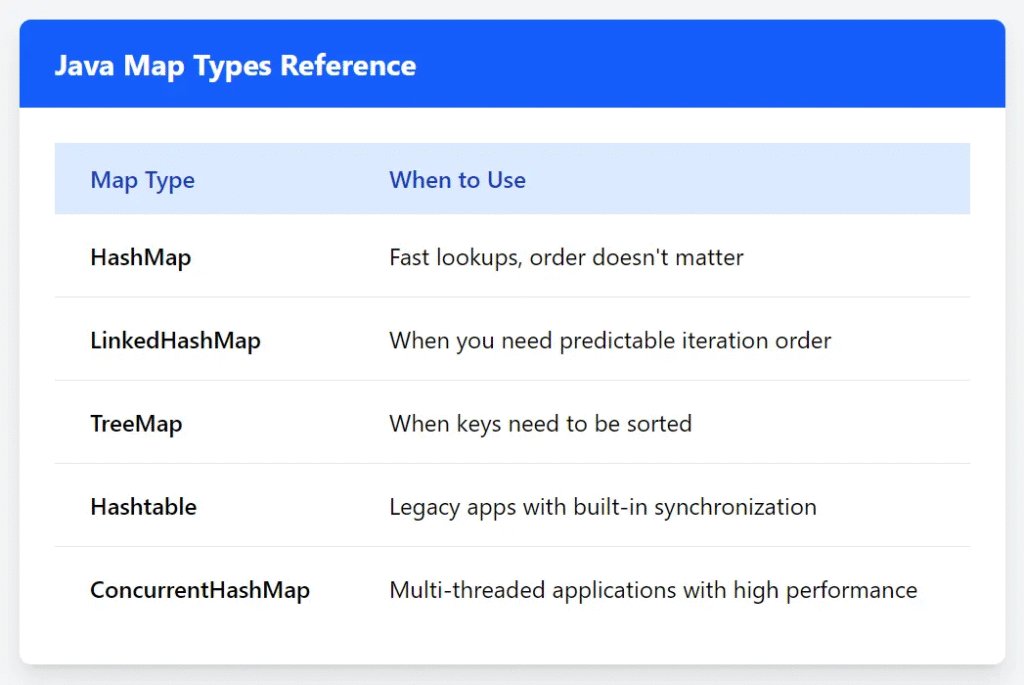
When to Use Which Map?
Choosing the correct Map depends on your needs.
Java Map Tutorial Tips for SEO
If you’re creating Java tutorials, consider these tips:
- Use clear headings like “Java Map Example” or “TreeMap in Java.”
- Add code snippets for visual clarity.
- Include keywords naturally in subheadings and descriptions.
- Explain concepts with real-world analogies.
For instance, compare a Map to a contact list where each name (key) maps to a phone number (value).
Finally
Maps are indispensable in Java programming. They make your code faster, cleaner, and easier to understand. Whether you’re building a web app, managing user sessions, or handling data, Maps provide the structure you need.
This article was originally published on Medium.