
Apache Kafka has become essential in building data pipelines and real-time event-driven systems. Meanwhile, Spring Boot simplifies microservice development. When paired with Apache Avro, a schema-based serialization system, they create a powerful trio. This tutorial explores how to integrate Kafka into a Spring Boot application using Avro.
Why Use Kafka with Spring Boot and Avro?
Kafka allows applications to send and receive real-time messages. It’s reliable, scalable, and fault-tolerant. Spring Boot, on the other hand, provides a quick way to develop Java applications with minimal setup. Adding Avro ensures your Kafka messages remain compact, fast, and schema-safe.
By combining all three, developers gain control over data flow, structure, and reliability.
Setting Up the Environment
Before jumping into code, you need the right tools. Install Java 17 or higher. Ensure Apache Kafka is running locally or on a server. Use an IDE like IntelliJ IDEA or Eclipse for coding. Also, use Confluent’s schema registry to manage Avro schemas.
Next, generate a new Spring Boot project using Spring Initializr. Include these dependencies:
- Spring Web
- Spring for Apache Kafka
- Lombok
Now add Avro plugin support.
<?xml version="1.0" encoding="UTF-8"?>
<project xmlns="http://maven.apache.org/POM/4.0.0" xmlns:xsi="http://www.w3.org/2001/XMLSchema-instance"
 xsi:schemaLocation="http://maven.apache.org/POM/4.0.0 https://maven.apache.org/xsd/maven-4.0.0.xsd">
 <modelVersion>4.0.0</modelVersion>
 <parent>
  <groupId>org.springframework.boot</groupId>
  <artifactId>spring-boot-starter-parent</artifactId>
  <version>3.5.3</version>
  <relativePath/> <!-- lookup parent from repository -->
 </parent>
 <groupId>com.example</groupId>
 <artifactId>kafka-avro</artifactId>
 <version>0.0.1-SNAPSHOT</version>
 <name>kafka-avro</name>
 <description>Demo project for Spring Boot integrated with Kafka and apache avro</description>
 <url/>
 <licenses>
  <license/>
 </licenses>
 <developers>
  <developer/>
 </developers>
 <scm>
  <connection/>
  <developerConnection/>
  <tag/>
  <url/>
 </scm>
 <properties>
  <java.version>21</java.version>
 </properties>
 <dependencies>
  <dependency>
   <groupId>org.springframework.boot</groupId>
   <artifactId>spring-boot-starter-actuator</artifactId>
  </dependency>
  <dependency>
   <groupId>org.springframework.boot</groupId>
   <artifactId>spring-boot-starter-web</artifactId>
  </dependency>
  <dependency>
   <groupId>org.springframework.kafka</groupId>
   <artifactId>spring-kafka</artifactId>
  </dependency>
  <dependency>
   <groupId>org.projectlombok</groupId>
   <artifactId>lombok</artifactId>
   <optional>true</optional>
  </dependency>
  <dependency>
   <groupId>org.springframework.boot</groupId>
   <artifactId>spring-boot-starter-test</artifactId>
   <scope>test</scope>
  </dependency>
  <dependency>
   <groupId>org.springframework.kafka</groupId>
   <artifactId>spring-kafka-test</artifactId>
   <scope>test</scope>
  </dependency>
  <!-- https://mvnrepository.com/artifact/org.apache.avro/avro -->
  <dependency>
   <groupId>org.apache.avro</groupId>
   <artifactId>avro</artifactId>
   <version>1.12.0</version>
  </dependency>
  <dependency>
   <groupId>io.confluent</groupId>
   <artifactId>kafka-avro-serializer</artifactId>
   <version>8.0.0</version>
  </dependency>
 </dependencies>

 <repositories>
  <repository>
   <id>confluent</id>
   <url>https://packages.confluent.io/maven</url>
  </repository>
 </repositories>

 <build>
  <plugins>
   <plugin>
    <groupId>org.apache.maven.plugins</groupId>
    <artifactId>maven-compiler-plugin</artifactId>
    <configuration>
     <annotationProcessorPaths>
      <path>
       <groupId>org.projectlombok</groupId>
       <artifactId>lombok</artifactId>
      </path>
     </annotationProcessorPaths>
    </configuration>
   </plugin>
   <plugin>
    <groupId>org.springframework.boot</groupId>
    <artifactId>spring-boot-maven-plugin</artifactId>
    <configuration>
     <excludes>
      <exclude>
       <groupId>org.projectlombok</groupId>
       <artifactId>lombok</artifactId>
      </exclude>
     </excludes>
    </configuration>
   </plugin>
   <plugin>
    <groupId>org.apache.avro</groupId>
    <artifactId>avro-maven-plugin</artifactId>
    <version>1.12.0</version>
    <executions>
     <execution>
      <goals>
       <goal>schema</goal>
      </goals>
      <configuration>
       <sourceDirectory>${project.basedir}/src/main/resources/avro</sourceDirectory>
       <outputDirectory>${project.basedir}/src/main/java</outputDirectory>
      </configuration>
     </execution>
    </executions>
   </plugin>
  </plugins>
 </build>

</project>
This plugin compiles your .avsc files into Java classes.
Setting Up Kafka and Schema-registry Server on Docker
services:
  zookeeper:
    image: confluentinc/cp-zookeeper:7.5.3 # Use a recent, stable Confluent Platform version
    hostname: zookeeper
    container_name: zookeeper-single
    ports:
      - "2181:2181"
    environment:
      ZOOKEEPER_CLIENT_PORT: 2181
      ZOOKEEPER_TICK_TIME: 2000

  kafka:
    image: confluentinc/cp-kafka:7.5.3 # Must match Zookeeper version for compatibility
    hostname: kafka
    container_name: kafka-single
    ports:
      - "9092:9092"
      - "9093:9093" # For inter-broker communication (if expanding to multi-node)
    depends_on:
      - zookeeper
    environment:
      KAFKA_BROKER_ID: 1
      KAFKA_ZOOKEEPER_CONNECT: zookeeper:2181
      KAFKA_LISTENER_SECURITY_PROTOCOL_MAP: PLAINTEXT:PLAINTEXT,PLAINTEXT_HOST:PLAINTEXT
      KAFKA_ADVERTISED_LISTENERS: PLAINTEXT://kafka:29092,PLAINTEXT_HOST://localhost:9092
      KAFKA_OFFSETS_TOPIC_REPLICATION_FACTOR: 1
      KAFKA_TRANSACTION_STATE_LOG_MIN_ISR: 1
      KAFKA_TRANSACTION_STATE_LOG_REPLICATION_FACTOR: 1
      KAFKA_INTER_BROKER_LISTENER_NAME: PLAINTEXT

  schema-registry:
    image: confluentinc/cp-schema-registry:7.5.3 # Match your Kafka/Zookeeper version
    hostname: schema-registry
    container_name: schema-registry
    ports:
      - "8081:8081" # Map Schema Registry port
    depends_on:
      - kafka # Schema Registry depends on Kafka
    environment:
      SCHEMA_REGISTRY_HOST_NAME: schema-registry
      SCHEMA_REGISTRY_KAFKASTORE_BOOTSTRAP_SERVERS: kafka:29092 # Internal Kafka listener
      SCHEMA_REGISTRY_LISTENERS: http://0.0.0.0:8081 # Listen on all interfaces
Run server
docker compose up
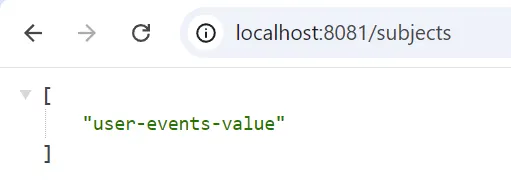
Check the Schema-registry Server
http://localhost:8081/subjects

Optional
Kafka Server on Docker with WebUI for Monitoring
Defining the Avro Schema
To use Avro, define a schema file under src/main/resources/avro. Name it UserEvent.avsc.
{
  "type": "record",
  "name": "UserEvent",
  "namespace": "com.example.kafka_avro.avro",
  "fields": [
    {"name": "userId", "type": "string"},
    {"name": "action", "type": "string"},
    {"name": "timestamp", "type": "long"}
  ]
}
This schema describes a user action event. When compiled, it creates a corresponding Java class.
Create UserEvent.java for Kafka producer and consumer
mvn clean install
If you use IntelliJ IDEA.
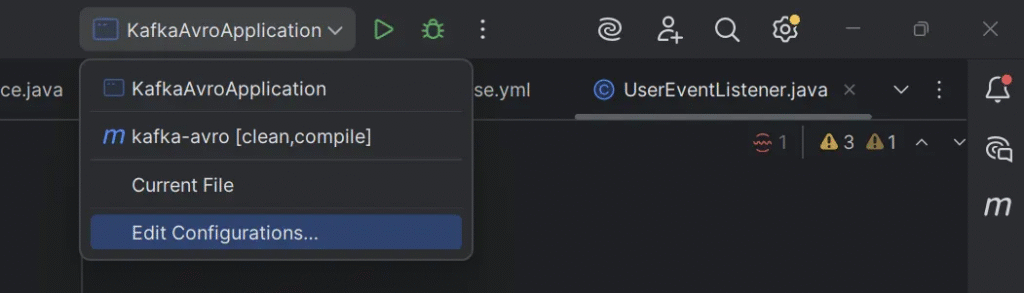
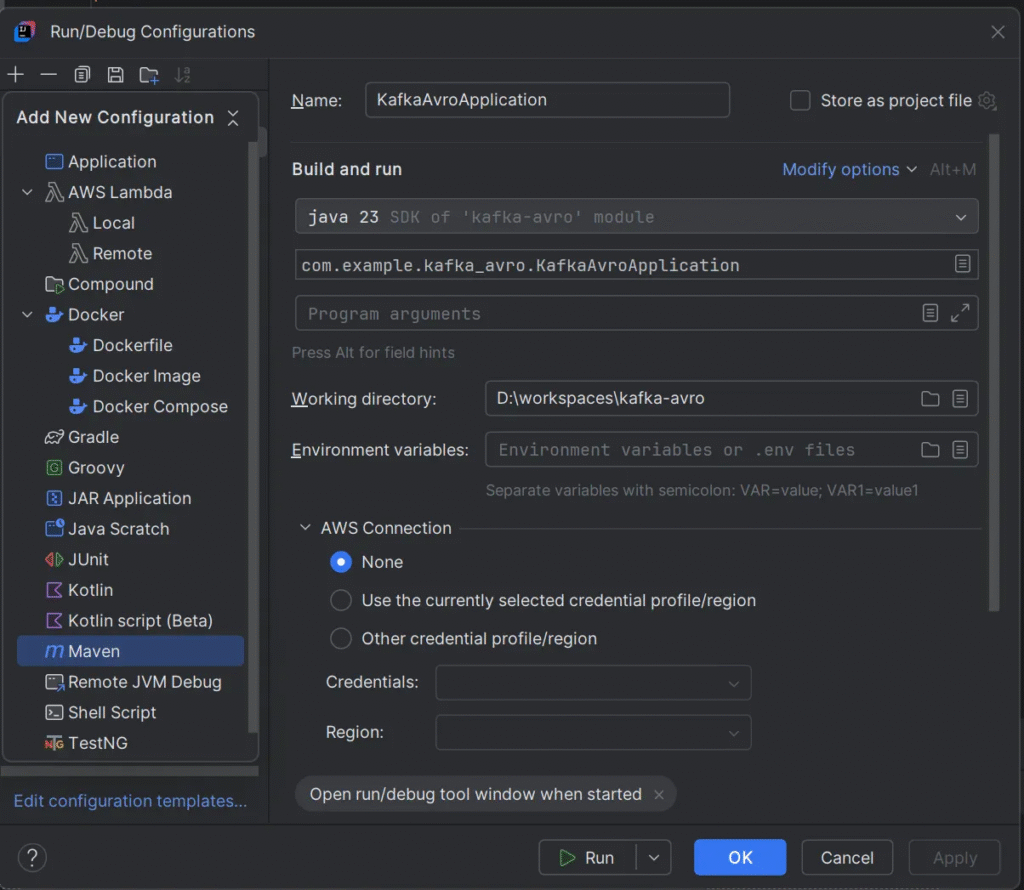
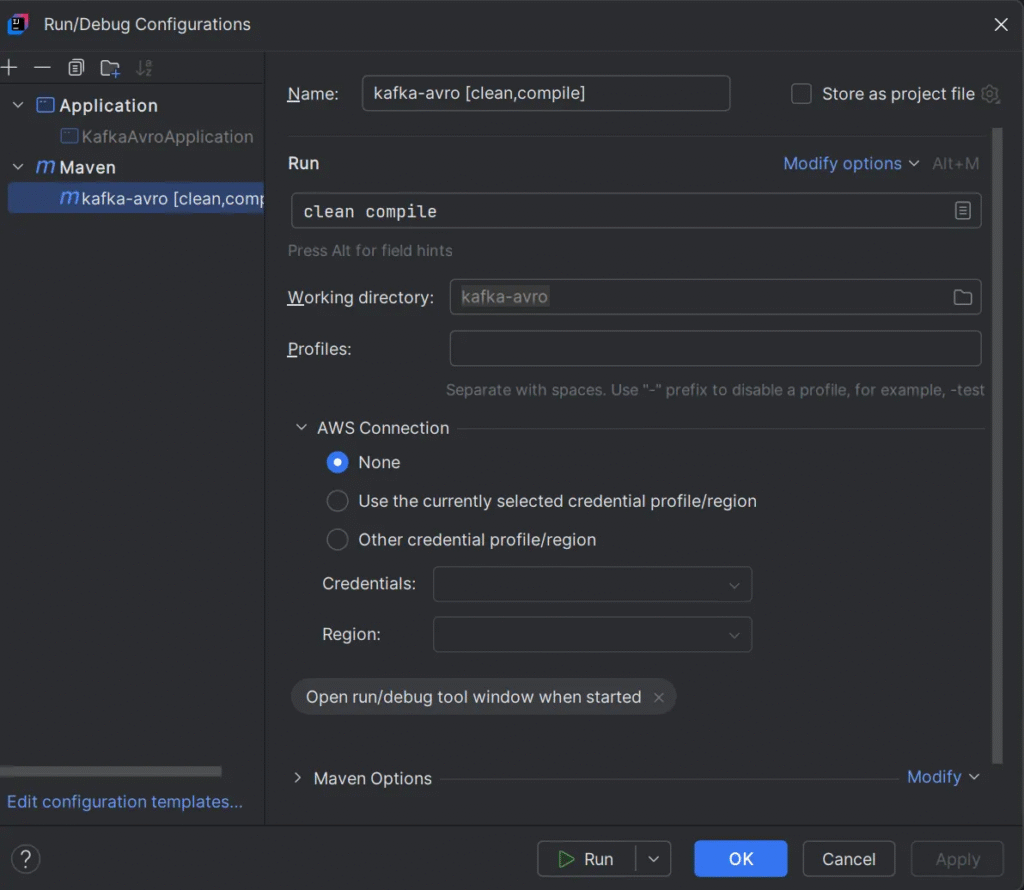
clean complie
Run command
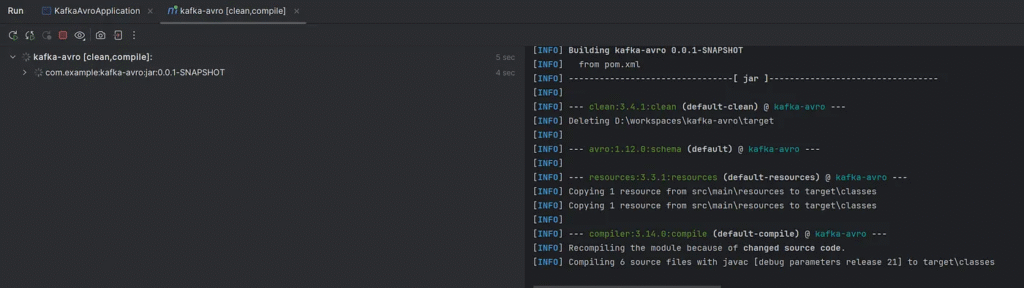
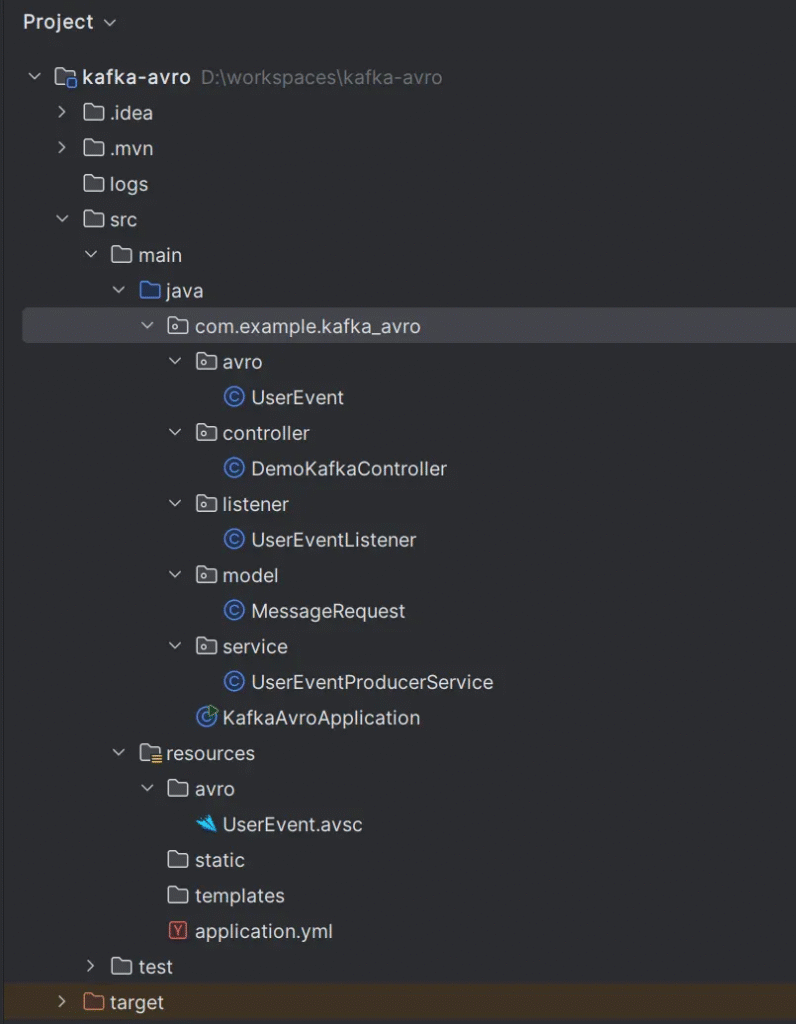
UserEventUserEvent will be created in the project that follows the package by namespace inside the avsc file.
Project structure
Kafka Producer Configuration
First, configure Kafka in your application.yml.
spring:
  kafka:
    producer:
      bootstrap-servers: localhost:9092
      key-serializer: org.apache.kafka.common.serialization.StringSerializer
      value-serializer: io.confluent.kafka.serializers.KafkaAvroSerializer
      properties:
        schema.registry.url: http://localhost:8081
        specific:
          avro:
            writer: true
This configuration ensures Kafka messages are serialized using Avro and sent to the broker correctly.
Creating the Kafka Producer
Create a producer service class named UserEventProducer.
package com.example.kafka_avro.service;

import com.example.kafka_avro.avro.UserEvent;
import lombok.RequiredArgsConstructor;
import org.springframework.kafka.core.KafkaTemplate;
import org.springframework.stereotype.Service;


@Service
@RequiredArgsConstructor
public class UserEventProducerService {
    private final KafkaTemplate<String, UserEvent> kafkaTemplate;

    public void sendEvent(UserEvent event) {
        kafkaTemplate.send("user-events", (String) event.getUserId(), event);
    }
}
The method sendEvent sends a message using the user ID as a key. Kafka partitions data by key to ensure message ordering.
Kafka Consumer Setup
Now, configure your Kafka consumer in the same application.yml.
spring:
  kafka:
    consumer:
      bootstrap-servers: localhost:9092
      group-id: my-group
      auto-offset-reset: earliest
      key-deserializer: org.apache.kafka.common.serialization.StringDeserializer
      value-deserializer: io.confluent.kafka.serializers.KafkaAvroDeserializer
      properties:
        schema.registry.url: http://localhost:8081
        specific:
          avro:
            reader: true
Then implement the consumer logic.
Option 1
package com.example.kafka_avro.listener;


import com.example.kafka_avro.avro.UserEvent;
import lombok.extern.slf4j.Slf4j;
import org.springframework.kafka.annotation.KafkaListener;
import org.springframework.stereotype.Component;

@Component
@Slf4j
public class UserEventListener {

    @KafkaListener(topics = "user-events", groupId = "group_id")
    public void handleUserEvent(UserEvent userEvent) {
        log.info("Received {}", userEvent);
    }

}
UserEvent userEvent: Spring Kafka automatically deserializes the incoming Kafka message’s value into a UserEvent object.
Option 2
package com.example.kafka_avro.listener;


import com.example.kafka_avro.avro.UserEvent;
import lombok.extern.slf4j.Slf4j;
import org.springframework.kafka.annotation.KafkaListener;
import org.springframework.stereotype.Component;
import org.springframework.messaging.Message;

@Component
@Slf4j
public class UserEventListener {

    @KafkaListener(topics = "user-events", groupId = "group_id")
    public void handleUserEvent(Message<UserEvent> userEvent) {
        log.info("Received {}", userEvent);
    }

}
Message<UserEvent> userEvent: Spring Kafka automatically deserializes the incoming Kafka message’s value into a UserEvent object and then wraps it inside a org.springframework.messaging.Message object. This Message object provides access to the UserEvent payload (via userEvent.getPayload()) as well as message headers (via userEvent.getHeaders()) which contain metadata like Kafka topic, partition, offset, timestamp, and more.
Testing the Integration
To test the setup, expose a REST endpoint that triggers Kafka events.
package com.example.kafka_avro.controller;


import com.example.kafka_avro.avro.UserEvent;
import com.example.kafka_avro.model.MessageRequest;
import com.example.kafka_avro.service.UserEventProducerService;
import lombok.RequiredArgsConstructor;
import org.springframework.web.bind.annotation.PostMapping;
import org.springframework.web.bind.annotation.RequestBody;
import org.springframework.web.bind.annotation.RestController;

@RestController
@RequiredArgsConstructor
public class DemoKafkaController {

    private final UserEventProducerService producer;

    @PostMapping("/publish")
    public String publishMessage(@RequestBody MessageRequest data) {
        UserEvent userEvent = UserEvent.newBuilder()
                .setUserId(data.getUserId())
                .setAction(data.getAction())
                .setTimestamp(data.getTimestamp())
                .build();
        producer.sendEvent(userEvent);
        return "Published successfully";
    }

}
Create a request model.
package com.example.kafka_avro.model;

import lombok.Getter;
import lombok.Setter;

@Getter
@Setter
public class MessageRequest {

    private String userId;
    private String action;
    private Long timestamp;

}
Problem
When you get an error message.
Caused by: org.springframework.messaging.converter.MessageConversionException: Cannot convert from [com.example.kafka_avro.avro.UserEvent] to [com.example.kafka_avro.avro.UserEvent] for GenericMessage [payload={"userId": "user123", "action": "LOGIN", "timestamp": 1689442145000}, headers={kafka_offset=41, kafka_consumer=org.springframework.kafka.core.DefaultKafkaConsumerFactory$ExtendedKafkaConsumer@43ef092b, kafka_timestampType=CREATE_TIME, kafka_receivedPartitionId=0, kafka_receivedMessageKey=user123, kafka_receivedTopic=user-events, kafka_receivedTimestamp=1751907012542, kafka_groupId=group_id}]
 at org.springframework.messaging.handler.annotation.support.PayloadMethodArgumentResolver.resolveArgument(PayloadMethodArgumentResolver.java:151) ~[spring-messaging-6.2.8.jar:6.2.8]
 at org.springframework.kafka.listener.adapter.KafkaNullAwarePayloadArgumentResolver.resolveArgument(KafkaNullAwarePayloadArgumentResolver.java:48) ~[spring-kafka-3.3.7.jar:3.3.7]
 at org.springframework.messaging.handler.invocation.HandlerMethodArgumentResolverComposite.resolveArgument(HandlerMethodArgumentResolverComposite.java:118) ~[spring-messaging-6.2.8.jar:6.2.8]
 at org.springframework.messaging.handler.invocation.InvocableHandlerMethod.getMethodArgumentValues(InvocableHandlerMethod.java:147) ~[spring-messaging-6.2.8.jar:6.2.8]
 at org.springframework.messaging.handler.invocation.InvocableHandlerMethod.invoke(InvocableHandlerMethod.java:115) ~[spring-messaging-6.2.8.jar:6.2.8]
 at org.springframework.kafka.listener.adapter.HandlerAdapter.invoke(HandlerAdapter.java:78) ~[spring-kafka-3.3.7.jar:3.3.7]
 at org.springframework.kafka.listener.adapter.MessagingMessageListenerAdapter.invokeHandler(MessagingMessageListenerAdapter.java:475) ~[spring-kafka-3.3.7.jar:3.3.7]
 ... 14 common frames omitted
Caused by: org.springframework.messaging.converter.MessageConversionException: No converter found from actual payload type 'com.example.kafka_avro.avro.UserEvent' to expected payload type 'com.example.kafka_avro.avro.UserEvent' at org.springframework.messaging.handler.annotation.support.MessageMethodArgumentResolver.convertPayload(MessageMethodArgumentResolver.java:147) ~[spring-messaging-6.2.8.jar:6.2.8] at org.springframework.messaging.handler.annotation.support.MessageMethodArgumentResolver.resolveArgument(MessageMethodArgumentResolver.java:94) ~[spring-messaging-6.2.8.jar:6.2.8] at org.springframework.messaging.handler.invocation.HandlerMethodArgumentResolverComposite.resolveArgument(HandlerMethodArgumentResolverComposite.java:118) ~[spring-messaging-6.2.8.jar:6.2.8] at org.springframework.messaging.handler.invocation.InvocableHandlerMethod.getMethodArgumentValues(InvocableHandlerMethod.java:147) ~[spring-messaging-6.2.8.jar:6.2.8] at org.springframework.messaging.handler.invocation.InvocableHandlerMethod.invoke(InvocableHandlerMethod.java:115) ~[spring-messaging-6.2.8.jar:6.2.8] at org.springframework.kafka.listener.adapter.HandlerAdapter.invoke(HandlerAdapter.java:78) ~[spring-kafka-3.3.7.jar:3.3.7] at org.springframework.kafka.listener.adapter.MessagingMessageListenerAdapter.invokeHandler(MessagingMessageListenerAdapter.java:475) ~[spring-kafka-3.3.7.jar:3.3.7] ... 14 common frames omitted
Solution 1
You should check pom.xml and remove spring-boot-devtools:
<dependency>
   <groupId>org.springframework.boot</groupId>
   <artifactId>spring-boot-devtools</artifactId>
   <scope>runtime</scope>
   <optional>true</optional>
</dependency>
Solution 2
Add a restart configuration for Spring DevTools.
package com.example.kafka_avro;

import org.springframework.boot.SpringApplication;
import org.springframework.boot.autoconfigure.SpringBootApplication;

@SpringBootApplication
public class KafkaAvroApplication {

   public static void main(String[] args) {
    System.setProperty("spring.devtools.restart.enabled", "false");
    SpringApplication.run(KafkaAvroApplication.class, args);
   }

}
How spring-boot-devtools Works (and Causes Problems)
spring-boot-devtools uses two class loaders by default:
- Base Class Loader (Parent): Loads classes from your external libraries (dependencies like Spring Boot, Spring Kafka, Confluent serializers, Avro itself, etc., basically anything in your
JARdependencies). These classes are generally not reloaded. - Restart Class Loader (Child): Loads your application’s classes (anything in
src/main/java,src/main/resources, and generated sources like Avro classes. This is the class loader that gets discarded and reloaded on code changes to provide the “hot restart” functionality.
The core problem arises when a class (like com.example.kafka_avro.avro.UserEvent) is referenced by code loaded by both class loaders, or when a framework (like Spring Kafka) expects a single, consistent view of a type.
Test application
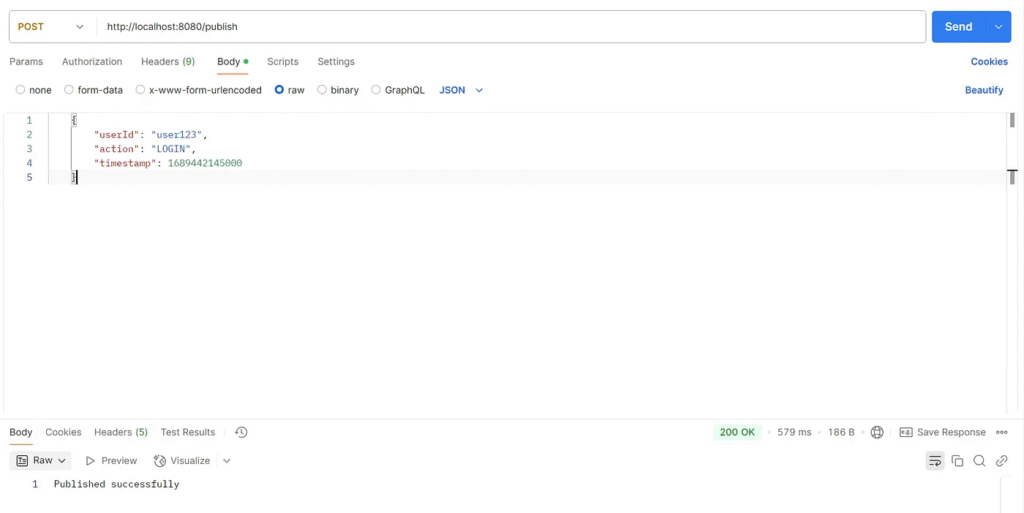
http://localhost:8080/publish
Listener option 1
Send a message using Postman.
{
    "userId": "user123",
    "action": "LOGIN",
    "timestamp": 1689442145000
}
Check the consumer.
2025-07-07T23:56:38.956+07:00  INFO 81300 --- [nio-8080-exec-2] o.a.k.clients.producer.KafkaProducer     : [Producer clientId=producer-1] Instantiated an idempotent producer.
2025-07-07T23:56:38.974+07:00  INFO 81300 --- [nio-8080-exec-2] o.a.k.clients.producer.ProducerConfig    : These configurations '[schema.registry.url, specific.avro.writer]' were supplied but are not used yet.
2025-07-07T23:56:38.975+07:00  INFO 81300 --- [nio-8080-exec-2] o.a.kafka.common.utils.AppInfoParser     : Kafka version: 3.9.1
2025-07-07T23:56:38.975+07:00  INFO 81300 --- [nio-8080-exec-2] o.a.kafka.common.utils.AppInfoParser     : Kafka commitId: f745dfdcee2b9851
2025-07-07T23:56:38.975+07:00  INFO 81300 --- [nio-8080-exec-2] o.a.kafka.common.utils.AppInfoParser     : Kafka startTimeMs: 1751907398975
2025-07-07T23:56:38.987+07:00  INFO 81300 --- [ad | producer-1] org.apache.kafka.clients.Metadata        : [Producer clientId=producer-1] Cluster ID: 7d3m4VuhTTCc-q0Ok3G9tQ
2025-07-07T23:56:38.990+07:00  INFO 81300 --- [ad | producer-1] o.a.k.c.p.internals.TransactionManager   : [Producer clientId=producer-1] ProducerId set to 2029 with epoch 0
2025-07-07T23:56:39.313+07:00  INFO 81300 --- [ntainer#0-0-C-1] c.e.k.listener.UserEventListener         : Received {"userId": "user123", "action": "LOGIN", "timestamp": 1689442145000}
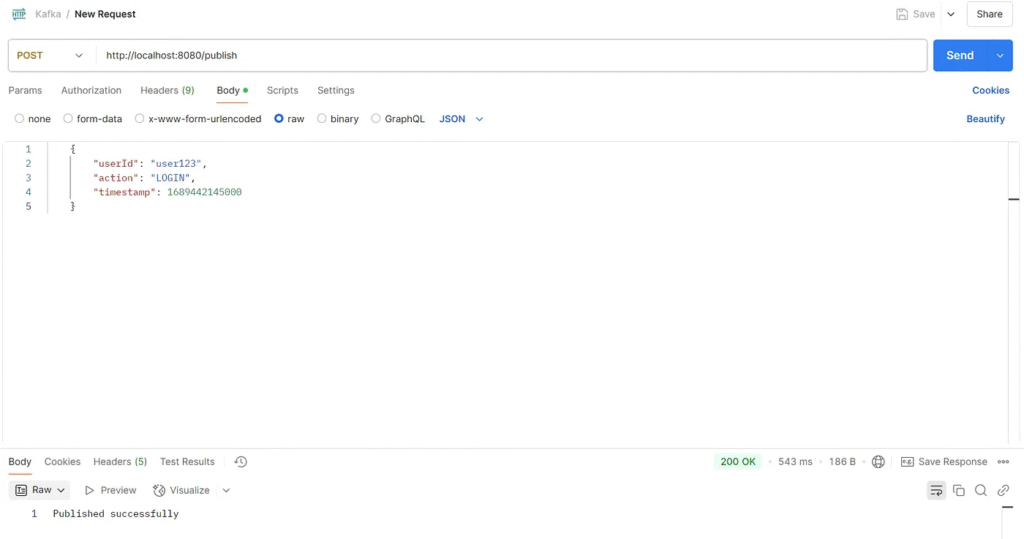
Listener option 2
Send a message using Postman.
{
    "userId": "user123",
    "action": "LOGIN",
    "timestamp": 1689442145000
}
Check the consumer.
2025-07-08T00:05:58.506+07:00  INFO 81124 --- [nio-8080-exec-2] o.a.k.clients.producer.KafkaProducer     : [Producer clientId=producer-1] Instantiated an idempotent producer.
2025-07-08T00:05:58.530+07:00  INFO 81124 --- [nio-8080-exec-2] o.a.k.clients.producer.ProducerConfig    : These configurations '[schema.registry.url, specific.avro.writer]' were supplied but are not used yet.
2025-07-08T00:05:58.531+07:00  INFO 81124 --- [nio-8080-exec-2] o.a.kafka.common.utils.AppInfoParser     : Kafka version: 3.9.1
2025-07-08T00:05:58.531+07:00  INFO 81124 --- [nio-8080-exec-2] o.a.kafka.common.utils.AppInfoParser     : Kafka commitId: f745dfdcee2b9851
2025-07-08T00:05:58.531+07:00  INFO 81124 --- [nio-8080-exec-2] o.a.kafka.common.utils.AppInfoParser     : Kafka startTimeMs: 1751907958531
2025-07-08T00:05:58.543+07:00  INFO 81124 --- [ad | producer-1] org.apache.kafka.clients.Metadata        : [Producer clientId=producer-1] Cluster ID: 7d3m4VuhTTCc-q0Ok3G9tQ
2025-07-08T00:05:58.544+07:00  INFO 81124 --- [ad | producer-1] o.a.k.c.p.internals.TransactionManager   : [Producer clientId=producer-1] ProducerId set to 2030 with epoch 0
2025-07-08T00:05:58.862+07:00  INFO 81124 --- [ntainer#0-0-C-1] c.e.k.listener.UserEventListener         : Received GenericMessage [payload={"userId": "user123", "action": "LOGIN", "timestamp": 1689442145000}, headers={kafka_offset=43, kafka_consumer=org.springframework.kafka.core.DefaultKafkaConsumerFactory$ExtendedKafkaConsumer@66caee3a, kafka_timestampType=CREATE_TIME, kafka_receivedPartitionId=0, kafka_receivedMessageKey=user123, kafka_receivedTopic=user-events, kafka_receivedTimestamp=1751907958544, kafka_groupId=group_id}]
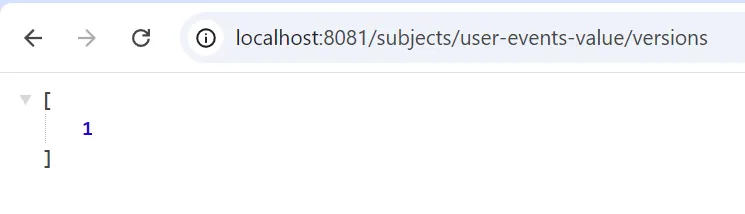
Check the schema version.
http://localhost:8081/subjects
http://localhost:8081/subjects/user-events-value/versions
http://localhost:8081/subjects/user-events-value/versions/1

Change version.
Modify your Avro schema (.avsc file) locally.
Generate new Avro Java classes from your updated .avsc file using the Avro Maven Plugin. This will update your UserEvent.java.
In essence, you “change” versions by submitting a new, compatible schema definition. Schema Registry handles the versioning automatically.
When your Kafka producer, configured with KafkaAvroSerializer, sends a message with the new UserEvent schema to the user-events topic, the KafkaAvroSerializer will automatically:
- Compare the new schema with the latest schema registered under the
user-events-valuesubject in the Schema Registry. - If the new schema is compatible according to the subject’s compatibility settings (default is
BACKWARD), it will register the new schema as the next version (e.g., version 2). - It will then use this new schema’s ID when serializing your message.
Compatibility Mode
 schema-registry:
    image: confluentinc/cp-schema-registry:7.5.3
    hostname: schema-registry
    container_name: schema-registry
    ports:
      - "8081:8081"
    environment:
      SCHEMA_REGISTRY_HOST_NAME: schema-registry
      SCHEMA_REGISTRY_KAFKASTORE_BOOTSTRAP_SERVERS: kafka:29092
      SCHEMA_REGISTRY_LISTENERS: http://0.0.0.0:8081
      # --- IMPORTANT: Set Global Compatibility Mode Here ---
      SCHEMA_REGISTRY_SCHEMA_COMPATIBILITY_LEVEL: BACKWARD # Default, but explicitly set
      # SCHEMA_REGISTRY_SCHEMA_COMPATIBILITY_LEVEL: NONE
      # SCHEMA_REGISTRY_SCHEMA_COMPATIBILITY_LEVEL: FORWARD
      # SCHEMA_REGISTRY_SCHEMA_COMPATIBILITY_LEVEL: FULL
      # SCHEMA_REGISTRY_SCHEMA_COMPATIBILITY_LEVEL: BACKWARD_TRANSITIVE
      # SCHEMA_REGISTRY_SCHEMA_COMPATIBILITY_LEVEL: FORWARD_TRANSITIVE
      # SCHEMA_REGISTRY_SCHEMA_COMPATIBILITY_LEVEL: FULL_TRANSITIVE
    depends_on:
      - kafka
Common Compatibility Modes:
NONE: No compatibility checks are performed. Any schema can be registered. (Use with extreme caution!)BACKWARD(Default): New schemas can read data written with older schemas. Allows adding optional fields and deleting fields that have a default. This is the most common and generally safest for Kafka.FORWARD: Old schemas can read data written with newer schemas. Allows adding required fields (if the old schema ignores them) and deleting optional fields.FULL: BothBACKWARDandFORWARDcompatibility are ensured. Only very minor changes are allowed (e.g., adding/removing optional fields).BACKWARD_TRANSITIVE: LikeBACKWARD, but checks against all previous versions, not just the immediately preceding one.FORWARD_TRANSITIVE: LikeFORWARD, but checks against all previous versions.FULL_TRANSITIVE: LikeFULL, but checks against all previous versions.
Benefits of Using Apache Avro
Avro offers several advantages. First, it ensures vigorous schema enforcement. Second, it reduces payload size. Third, it allows schema evolution, making backward compatibility easier. Kafka and Avro together help build efficient pipelines.
Moreover, Confluent’s schema registry simplifies schema storage and versioning. That means you can update schemas without breaking old consumers.
Final Thoughts
Spring Boot, Kafka, and Avro form a robust architecture for real-time systems. This integration supports scalable, maintainable microservices. While Avro adds complexity, it pays off in performance and data quality. Keep your code modular and schemas clear. Doing so will make your applications resilient and future-proof.
Start small, test often, and iterate fast. That’s the best way to master this integration.
This article was originally published on Medium.

This guide is incredibly helpful for setting up Kafka with Avro and Schema Registry. The step-by-step instructions and clear explanations made it easy to follow and implement. Great job!