Spring AI streamlines the integration of AI models into Java applications. Built on Spring Boot’s reactive foundation, it provides a modern approach to handling AI responses in real-time. The stream() method is one of its most powerful features. It enables live token streaming from the model, giving users an immediate and interactive experience.
In this tutorial, you’ll explore how stream() works, what response types it returns, and how to use it effectively. You’ll build a small reactive Spring Boot application to consume streaming responses from an AI model.
By the end, you’ll understand how to integrate streaming into your backend workflows and UIs. You’ll also see how Flux<String>, Flux<ChatResponse>, and Flux<ChatClientResponse> differ and when to use each one.
1. Understanding the Role of stream() in Spring AI
The stream() method converts a standard chat request into a live data stream. Unlike a blocking request, it doesn’t wait for the full model output to be generated. Instead, it emits data chunks, such as tokens or response objects, as soon as they’re ready.
This streaming behavior naturally aligns with Spring’s reactive programming model. Developers can use Project Reactor’s Flux API to subscribe to these emissions and process them asynchronously. The result feels like a continuous conversation with the AI, rather than a delayed single response.
Internally, stream() wraps the model’s response channel and maps each message token to a reactive event. The method is part of the ChatClient class in the org.springframework.ai.client package.
You’ll often use it when creating AI-driven interfaces that display tokens as they arrive — just like ChatGPT does in real time.
For example, a typical call might look like this:
Flux<String> content = chatClient
    .prompt()
    .user("Explain the concept of dependency injection in Spring Boot")
    .stream()
    .content();
This snippet immediately starts returning text fragments instead of waiting for the full completion.
Example output
Dependency Injection (DI) is a core concept in the Spring Framework, and by extension, in Spring Boot. It's a specific form of a broader principle called **Inversion of Control (IoC)**.

Let's break down what it is, why it's used, and how Spring Boot implements it.

---

### The Problem Dependency Injection Solves (Without DI)

Imagine you have a `Car` class that needs an `Engine`. Without DI, your `Car` class might look like this:

```java
// Without Dependency Injection
class Engine {
    public void start() {
        System.out.println("Engine started!");
    }
}

class Car {
    private Engine engine;

    public Car() {
        // The Car class is responsible for creating its own Engine
        this.engine = new Engine(); // Tightly coupled!
    }

    public void drive() {
        engine.start();
        System.out.println("Car is driving.");
    }
}

public class MyApp {
    public static void main(String[] args) {
        Car car = new Car();
        car.drive();
    }
}
```
...
2. Setting Up Spring AI with Spring Boot
Before using stream(), set up your Spring Boot project. Start by adding dependencies for Spring AI and Spring WebFlux.


3. Exploring the Three Return Types
The stream() method supports multiple reactive return types. Each one serves a distinct purpose, depending on the amount of metadata you need.
Flux<String> content()
This is the simplest form. It streams only the raw text content as the AI model generates it. It’s ideal when you want to display text to users, such as in a chatbot UI.
Flux<String> content = chatClient
    .prompt()
    .user("List Spring Boot core features")
    .stream()
    .content();
Each emitted element represents a token or small text fragment. You can aggregate or display them incrementally on the client side.
Flux<ChatResponse> chatResponse()
If you need structured data, use chatResponse(). This version emits complete ChatResponse objects. These include token metadata, usage statistics, and message details.
Flux<ChatResponse> responses = chatClient
    .prompt()
    .user("Explain the use of annotations in Spring Boot")
    .stream()
    .chatResponse();
You might log metadata, measure token usage, or debug output sequences.
Flux<ChatClientResponse> chatClientResponse()
This variant offers the most control. It returns a Flux<ChatClientResponse> that wraps both the ChatResponse and the ChatClient execution context. You can access internal advisors, documents retrieved from RAG pipelines, and contextual data.
Flux<ChatClientResponse> clientResponses = chatClient
    .prompt()
    .user("Summarize the Spring AI documentation")
    .stream()
    .chatClientResponse();
This level of detail is suitable for complex enterprise use cases, where traceability and debugging are crucial.
4. Integrating Reactive Streaming into a Web Interface
To experience AI responses in real time, integrate the reactive stream with a simple web interface. Spring WebFlux and modern browsers make this easy using Server-Sent Events (SSE). This approach allows your server to push data continuously as it becomes available.
5. Why Reactive Streams Matter
Traditional HTTP calls block until the entire response completes. This design feels slow and inefficient for significant AI responses. Reactive streams, however, transform the experience.
When using Flux, you’re no longer bound to synchronous waiting. Each emitted token can be processed, stored, or displayed instantly. This model improves performance and reduces latency.
Spring AI leverages Project Reactor under the hood. Each emission passes through operators like map(), filter(), or flatMap(). These allow you to modify the stream in real-time.
For instance:
chatClient
    .prompt()
    .user("Write a haiku about Spring Boot")
    .stream()
    .content()
    .map(String::toUpperCase)
    .subscribe(System.out::print);
The example capitalizes each token as it streams.
Using reactive principles also simplifies integration with WebSockets or Kafka for distributed architectures. Streaming responses can power live dashboards, chatbots, or monitoring tools, enabling seamless integration and enhanced user experience.
6. Comparing Streaming with Non-Streaming Calls
It’s essential to understand when not to use stream().
A typical call waits for a complete response:
String fullResponse = chatClient
    .prompt()
    .user("Explain Spring Beans")
    .call()
    .content();
This method is simple and predictable. You’ll prefer it when you need the entire output at once — for example, when generating reports.
Streaming excels in interactive environments. Use it when you need continuous output, such as customer support assistants or educational tools.
The key trade-off involves control versus immediacy. Streaming offers a real-time flow but adds complexity in error handling and client communication.
7. Handling Errors and Cancellations
Because Flux is asynchronous, and error handling follows reactive patterns. You can capture exceptions using .onErrorResume() or .doOnError().
chatClient
    .prompt()
    .user("Generate a long poem about cloud computing")
    .stream()
    .content()
    .doOnError(error -> log.error("Error streaming: {}", error.getMessage()))
    .onErrorResume(e -> Flux.just("An error occurred. Please try again."))
    .subscribe(System.out::print);
If a client disconnects, the subscription cancels automatically. You can also manage cancellations manually using Disposable objects returned from subscribe().
8. Building a Complete Reactive Service
Let’s create a small service class that encapsulates the streaming logic.
@Service
@Slf4j
public class StreamingAiService {

    private final ChatClient chatClient;

    public StreamingAiService(ChatClient chatClient) {
        this.chatClient = chatClient;
    }

    public Flux<String> ask(String input) {
        return chatClient
                .prompt()
                .user(input)
                .stream()
                .content()
                .map(chunk -> chunk + " ")
                .doOnSubscribe(sub -> log.info("Streaming started..."))
                .doOnComplete(() -> log.info("Streaming finished."));
    }
}
Then inject it into your controller:
@RestController
public class StreamController {

    private final StreamingAiService service;

    public StreamController(StreamingAiService service) {
        this.service = service;
    }

    @GetMapping(value = "/ask", produces = MediaType.TEXT_EVENT_STREAM_VALUE)
    public Flux<String> ask(@RequestParam String q) {
        return service.ask(q);
    }
}
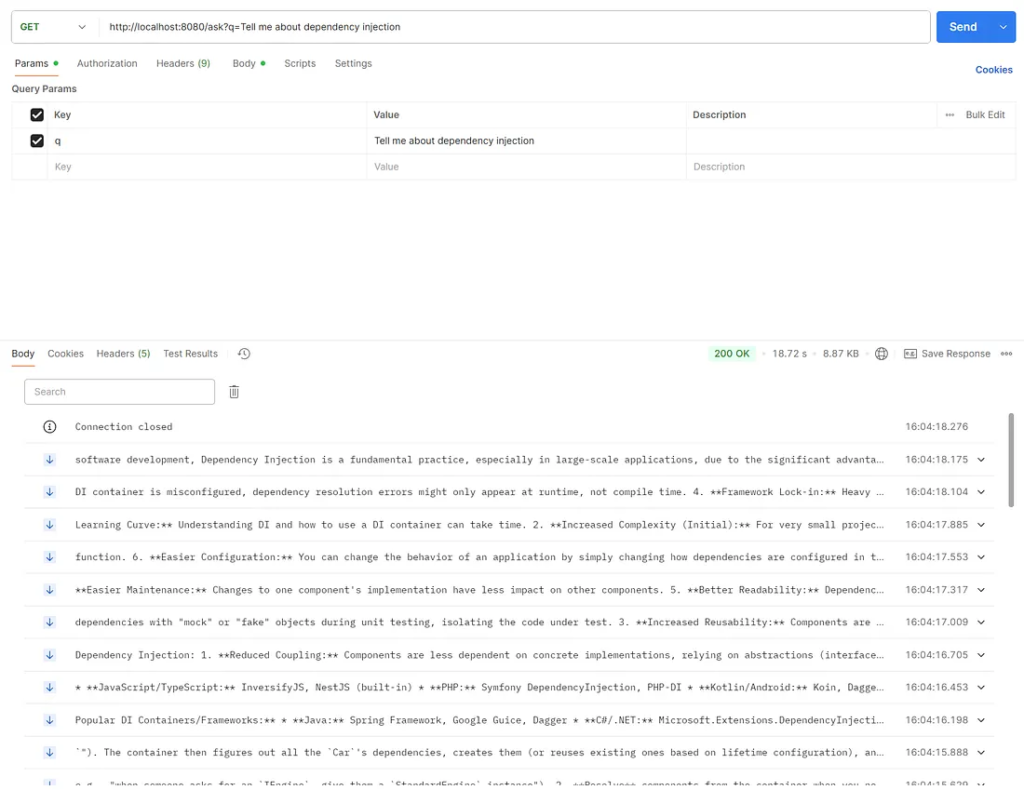
With this setup, your backend streams data to clients efficiently using non-blocking I/O.
http://localhost:8080/ask?q=Tell me about dependency injection
9. Observing Backpressure and Performance
Reactive streams handle backpressure gracefully. If the consumer can’t keep up, Reactor pauses emission until it’s ready. This control prevents memory overload when streaming large data sets.
You can apply limitRate() to fine-tune flow:
chatClient
    .prompt()
    .user("Describe microservices architecture")
    .stream()
    .content()
    .limitRate(50)
    .subscribe(System.out::println);
To enhance throughput, use parallel() or publishOn(Schedulers.boundedElastic()) for non-blocking tasks like logging.
Reactive systems perform best when each component stays asynchronous. Avoid converting Flux to blocking collections inside your service methods.
10. Testing Streaming Endpoints
Testing streaming endpoints requires reactive test utilities. Spring provides the StepVerifier class from Reactor Test.
@Test
void testStreamingContent() {
    Flux<String> flux = chatClient
        .prompt()
        .user("Name five Spring projects")
        .stream()
        .content();

    StepVerifier.create(flux)
        .thenConsumeWhile(token -> {
            assertNotNull(token);
            return true;
        })
        .verifyComplete();
}
This verifies that the Flux emits multiple tokens and completes correctly.
You can also use WebTestClient for integration testing SSE endpoints.
webTestClient.get()
    .uri("/api/ai/stream?question=Hello")
    .exchange()
    .expectStatus().isOk()
    .returnResult(String.class)
    .getResponseBody()
    .as(StepVerifier::create)
    .expectNextMatches(data -> !data.isEmpty())
    .thenCancel()
    .verify();
11. Practical Use Cases for stream()
Streaming unlocks creative possibilities across domains.
- Chat interfaces: Stream tokens as users type, simulating a human conversation.
- Code assistants: Generate code snippets incrementally.
- Report builders: Display partial results while background tasks are in progress.
- Monitoring systems: Stream anomaly explanations directly to dashboards.
- Voice applications: Convert streamed text to speech for real-time narration.
Each scenario benefits from immediate feedback, a hallmark of excellent user experience.
12. Tips for Production Use
When moving to production, monitor connection stability. Network interruptions can break SSE streams. Implement retry logic on the client side to reconnect automatically.
Utilize logging frameworks to track the token flow. Track latency and throughput metrics with tools like Micrometer.
Also, configure timeouts wisely. Long-running responses may require extended keep-alive intervals.
Security matters too. Always validate input parameters and use environment variables for API keys.
13. Advantages and Trade-offs
Streaming gives users instant insight into the model’s reasoning. It also reduces perceived latency. However, it introduces new design challenges.
Developers must manage client synchronization, error propagation, and UI buffering to ensure a seamless user experience. Testing reactive pipelines demands more effort.
Still, the trade-off favors streaming in modern web environments. Users expect immediacy, and reactive systems deliver it efficiently.
14. Extending stream() with Advanced Patterns
You can enrich streaming with custom operators. Combine multiple streams, merge sources, or throttle emissions.
Flux<String> result = chatClient
    .prompt()
    .user("Tell me about dependency injection")
    .stream()
    .content()
    .timeout(Duration.ofSeconds(60))
    .onErrorResume(e -> Flux.just("Timeout occurred."))
    .doFinally(signal -> log.info("Signal: {}", signal));
For enterprise integrations, couple stream data with R2DBC for reactive persistence or emit events to Kafka.
Reactive adapters enable you to broadcast tokens to multiple subscribers simultaneously, thereby creating scalable AI backbones.
15. Wrapping Up
The stream() method bridges AI interaction and reactive programming. It transforms static API calls into dynamic, continuous experiences.
Through this tutorial, you learned how to:
- Set up Spring AI with Spring Boot.
- Use the three return types:
Flux<String>,Flux<ChatResponse>, andFlux<ChatClientResponse>. - Stream responses via SSE to the client.
- Handle errors, testing, and performance.
As AI integration deepens in enterprise systems, mastering streaming will set your applications apart.
Finally
Streaming with Spring AI aligns perfectly with Spring Boot’s reactive nature. The stream() method brings immediacy, flexibility, and control to your AI workflows. By using it effectively, you can build highly interactive systems that keep users engaged and informed.
Experiment with each response type and adjust it to your needs. Whether you’re creating chatbots, assistants, or analytical dashboards, stream() Provides the foundation for real-time AI interaction in Java.
This article was originally published on Medium.