Java is one of the most popular programming languages, known for its object-oriented programming (OOP) paradigm. One of the fundamental concepts in Java OOP is abstraction, which allows developers to hide implementation details and expose only essential functionalities. Java provides two ways to achieve abstraction:
- Abstract classes
- Interfaces
This article will explore abstract classes in Java, their purpose, features, implementation, and best practices.
What is an Abstract Class?
An abstract class in Java is a class that cannot be instantiated and is designed to be inherited by other classes. It serves as a blueprint for subclasses, providing a base structure while allowing some methods to remain unimplemented (abstract).
Key Characteristics of an Abstract Class
- Defined using the
abstractkeyword. - May contain both abstract and concrete (non-abstract) methods.
- Cannot be instantiated directly.
- Can have constructors, fields, and static methods.
- Used when multiple related classes share common behavior but also require custom implementation in subclasses.
Syntax
abstract class Animal {
    abstract void makeSound();  // Abstract method (no implementation)

    void sleep() {  // Concrete method (has implementation)
        System.out.println("Sleeping...");
    }
}
Why Use Abstract Classes?
Abstract classes are useful in scenarios where:
- We need a common base class for multiple related classes.
- Some methods should be mandatory for subclasses to implement.
- We want to provide default behavior that subclasses can inherit or override.
- We need partial abstraction (some methods are implemented, some are not).
For example, consider a scenario where we have different types of animals that share some common behaviors but have unique sounds:
abstract class Animal {
    abstract void makeSound();

    void eat() {
        System.out.println("Eating...");
    }
}

class Dog extends Animal {
    void makeSound() {
        System.out.println("Bark!");
    }
}

class Cat extends Animal {
    void makeSound() {
        System.out.println("Meow!");
    }
}
Abstract Methods
An abstract method is a method that is declared without an implementation in an abstract class. Any subclass must implement it unless the subclass is also abstract.
Example
abstract class Vehicle {
    abstract void start(); // Abstract method
}

class Car extends Vehicle {
    void start() {
        System.out.println("Car is starting...");
    }
}
Concrete Methods in Abstract Classes
Abstract classes can also have concrete methods (fully implemented methods). These methods provide default functionality that subclasses can use without overriding.
Example
abstract class Device {
    abstract void powerOn();

    void powerOff() {
        System.out.println("Device is shutting down...");
    }
}

class Laptop extends Device {
    void powerOn() {
        System.out.println("Laptop is powering on...");
    }
}
Here, the powerOff() method is already implemented in Device, so Laptop does not need to override it.
Constructors in Abstract Classes
An abstract class can have constructors, but since it cannot be instantiated, these are only called when a subclass is instantiated.
Example
abstract class Employee {
    String name;

    Employee(String name) {
        this.name = name;
        System.out.println("Employee Constructor Called");
    }

    abstract void work();
}
class Developer extends Employee {
Developer(String name) {
super(name); // Calling superclass constructor
}
void work() {
System.out.println(name + " is writing code.");
}
}public class Main {
public static void main(String[] args) {
Developer dev = new Developer("Alice");
dev.work();
}
}Output:
Employee Constructor Called
Alice is writing code.
Abstract Class vs Interface

When to Use?
- Use abstract classes when multiple classes share behavior AND need some methods to be mandatory.
- Use interfaces when multiple classes must share only method signatures and support multiple inheritance.
Real-World Example: Bank Account
Let’s consider a real-world example where different bank accounts (e.g., savings account, current account) share common properties but have unique withdrawal rules.
abstract class BankAccount {
    String accountHolder;
    double balance;

    BankAccount(String accountHolder, double balance) {
        this.accountHolder = accountHolder;
        this.balance = balance;
    }

    abstract void withdraw(double amount);  // Abstract method

    void deposit(double amount) {  // Concrete method
        balance += amount;
        System.out.println("Deposited: $" + amount);
    }
}
class SavingsAccount extends BankAccount {
SavingsAccount(String accountHolder, double balance) {
super(accountHolder, balance);
}
void withdraw(double amount) {
if (balance - amount >= 100) { // Minimum balance requirement
balance -= amount;
System.out.println("Withdrawn: $" + amount);
} else {
System.out.println("Insufficient balance");
}
}
}public class Main {
public static void main(String[] args) {
SavingsAccount myAccount = new SavingsAccount("John Doe", 500);
myAccount.deposit(200);
myAccount.withdraw(600);
}
}Output:
Deposited: $200
Withdrawn: $600
Best Practices for Abstract Classes
1. Use abstract classes only when needed
- If there is no common behavior among subclasses, prefer interfaces.
2. Keep it minimal
- Define only necessary fields and methods.
3. Avoid instantiating abstract classes
- They should only serve as blueprints for subclasses.
4. Provide default implementations when possible
- Reduces code duplication.
5. Use proper naming conventions
- Abstract class names should clearly define the purpose (e.g.,
Vehicle,Employee,BankAccount).
Preventing Common Mistakes with Java Abstract Classes Using IntelliJ IDEA
IntelliJ IDEA is one of the most powerful IDEs for Java development, providing smart suggestions, real-time error detection, and refactoring tools that help prevent common mistakes when working with abstract classes. Here’s how to avoid errors and improve your coding efficiency using IntelliJ IDEA.
1. Enable Static Code Analysis for Real-time Error Detection
Mistake: Forgetting to Implement Abstract Methods
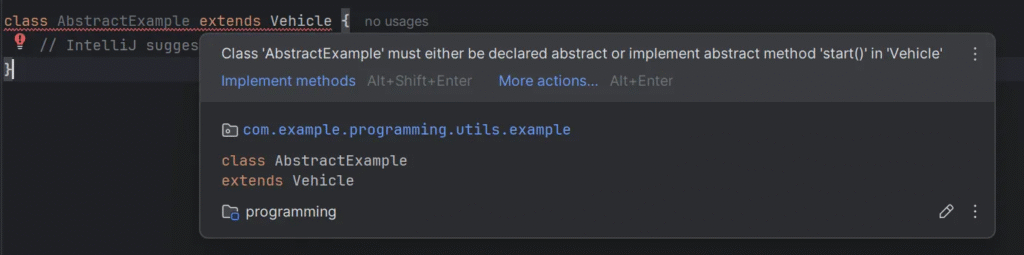
IntelliJ IDEA automatically highlights missing method implementations when you extend an abstract class without implementing all required methods.
Example:
abstract class Vehicle {
    abstract void start();
}

class Car extends Vehicle {
    // IntelliJ suggests implementing 'start()' automatically
}
2. Prevent Instantiating an Abstract Class with IntelliJ’s Warnings
Mistake: Trying to Instantiate an Abstract Class
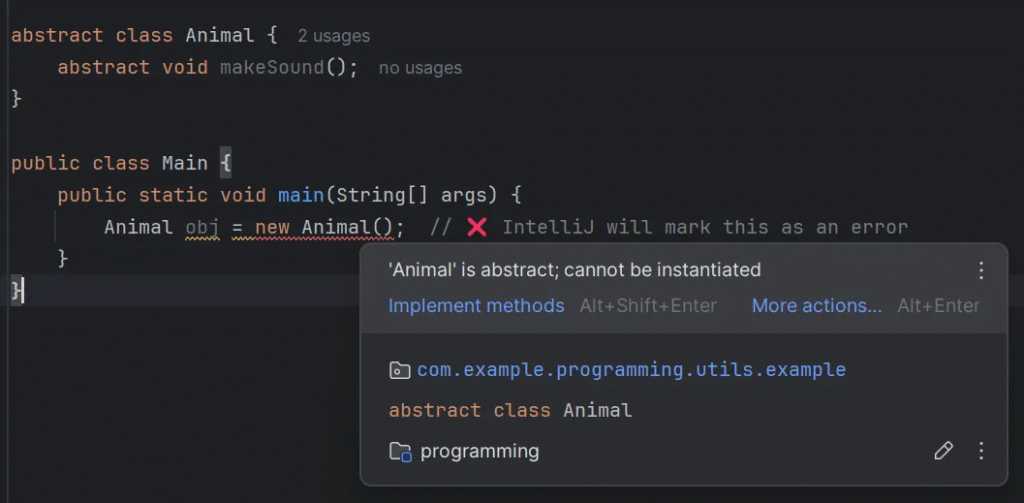
IntelliJ underlines the error and suggests a fix if you try to instantiate an abstract class.
Example (Incorrect Code — IntelliJ will flag this error):
abstract class Animal {
    abstract void makeSound();
}

public class Main {
    public static void main(String[] args) {
        Animal obj = new Animal();  // ❌ IntelliJ will mark this as an error
    }
}
3. Avoid Incorrect Method Overriding with IntelliJ’s Override Annotation
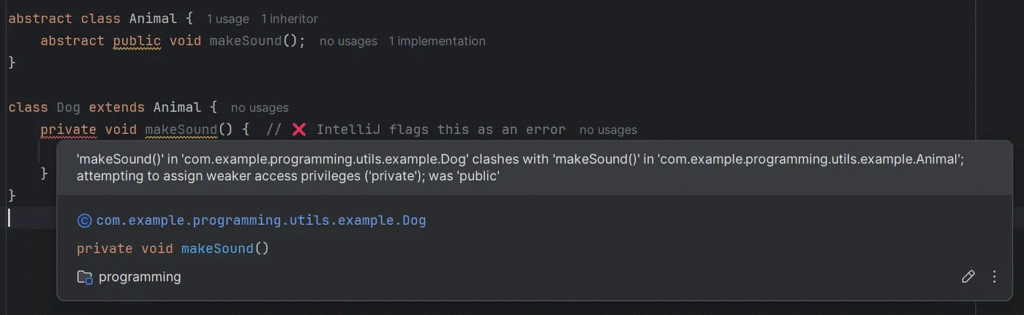
Mistake: Overriding an Abstract Method with a Weaker Access Modifier
Overriding an abstract method with a more restrictive access modifier (e.g., private) causes a compilation error.
abstract class Animal {
    abstract public void makeSound();
}

class Dog extends Animal {
    private void makeSound() {  // ❌ IntelliJ flags this as an error
        System.out.println("Bark!");
    }
}
4. Use IntelliJ’s Linting Tools to Detect Unnecessary Abstract Methods
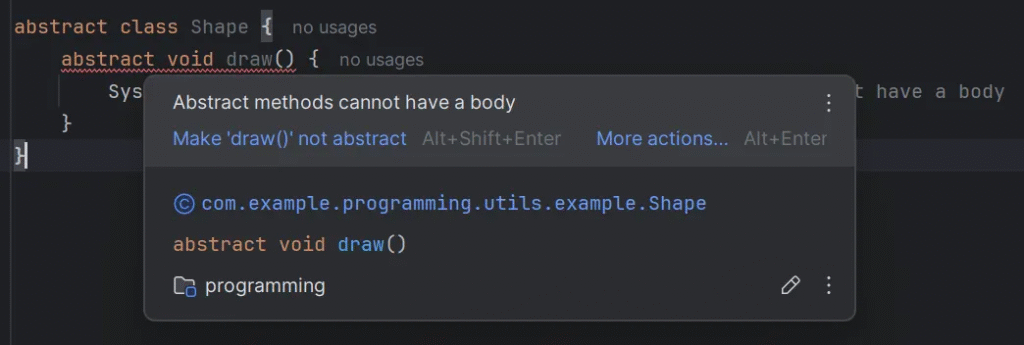
Mistake: Declaring Methods as Abstract When They Already Have Implementations
Declaring an abstract method with an implementation is redundant and will be flagged by IntelliJ.
abstract class Shape {
    abstract void draw() {
        System.out.println("Drawing...");  // ❌ Abstract methods cannot have a body
    }
}
Conclusion
Java abstract classes provide a powerful way to achieve abstraction while allowing some implementation details to be shared among subclasses. They are best used when multiple related classes share common behaviors but need individual implementations for specific features.
This article was originally published on Medium.