Modern web development evolves rapidly. New tools and frameworks appear every year. Developers want speed, flexibility, and a great user experience. That’s where HeroUI and Next.js 15 with the App Router come in. Together, they create a modern, powerful frontend stack.
Let’s explore how to use HeroUI with Next.js 15 and why this combination works so well.
What Is HeroUI?
HeroUI is a modern UI component library. It’s built on Tailwind CSS. This means every component is already styled with utility-first CSS. You get a clean, responsive design right out of the box.
HeroUI offers dozens of prebuilt components. These include forms, modals, cards, navigation, and more. Each one is accessible and mobile-friendly. You don’t need to worry about responsiveness or dark mode support — it’s all included.
Most importantly, HeroUI uses clean, semantic HTML and well-structured React components. It’s easy to customize and integrate into any project.
Why Choose Next.js 15 with App Router?
Next.js 15 introduces significant improvements. Its App Router redefines routing with better flexibility. Instead of page-based routing, it uses folders and files in the /app directory. This structure allows:
1. Nested Layouts Made Easy
Before, sharing layouts between routes was awkward. You had to use getLayout functions or duplicate components.
Now, you can define layout.tsx Files that wrap child pages automatically. Want a persistent sidebar across your dashboard? Drop it in layout.tsx, and you’re done. No boilerplate needed.
2. File-Based Routing with Better Control
The file system still defines routes, but you now get more granularity. Files like page.tsx, loading.tsx, error.tsx, and layout.tsx Each serves a distinct role.
This separation means:
- You manage UI states with less logic.
- You prevent layout flashes on route changes.
- You handle loading and errors per route segment.
The new router is faster and more modular. It separates server and client components. This lets you optimize performance without complex hacks.
When combined with HeroUI, Next.js 15 creates a seamless development flow.
3. Server and Client Components
Next.js 15 supports React Server Components out of the box. This means you can write components that render on the server, fetch data, and send minimal HTML to the client.
You no longer need to fetch data in getServerSideProps. Just use an async function in a server component. Then hydrate only what’s necessary for the client.
This shift results in:
- Faster initial page loads
- Smaller JavaScript bundles
- Better SEO and crawlability
Client components are still fully supported. Use them where interactivity is required, such as forms, modals, dropdown menus, and other similar elements. The new use client directive makes this clear and explicit.
4. Improved Data Fetching
Fetching data becomes more straightforward and more powerful. The App Router uses the fetch API is natively inside server components—extra hooks or utilities are unnecessary.
Example:
export default async function Page() {
  const res = await fetch('https://api.example.com/data')
  const data = await res.json()

  return <pre>{JSON.stringify(data, null, 2)}</pre>
}
You can also cache responses, revalidate on intervals, or opt into streaming for dynamic content.
5. Enhanced Developer Experience
The App Router is built to reduce friction:
- Hot reloads are faster.
- Routing logic is predictable.
- Folder naming conventions guide you.
- The mental model aligns closely with real-world UI design.
Whether you’re building static blogs, dynamic dashboards, or e-commerce stores, the App Router adapts to your needs.
Setting Up HeroUI with Next.js 15
To begin, you need a Next.js 15 project.

Tutorial: Start a Project with Next.js and HeroUI Using TypeScript
How Routing Works with the App Router
Next.js 15 introduces a new way to handle routing: the App Router. This system replaces the older pages directory with an /app a directory that offers greater flexibility and power. It gives you more control over layouts, UI states, and performance. Let’s break it down.
File-Based Routing, Reimagined
Just like the pages directory, the App Router still uses your file structure to define routes. But this time, it goes deeper. Each folder inside /app becomes a route segment.
For example:
/app
  /about
    page.tsx
  /blog
    /[slug]
      page.tsx
Here’s what happens:
/app/about/page.tsxbecomes/about/app/blog/[slug]/page.tsxbecomes/blog/:slug
Simple. But there’s more.
Example Blog Post.

Dynamic Blog with Next.js & HeroUI Components
Route Segments and Special Files
The App Router introduces notable file names that define how parts of the app behave.
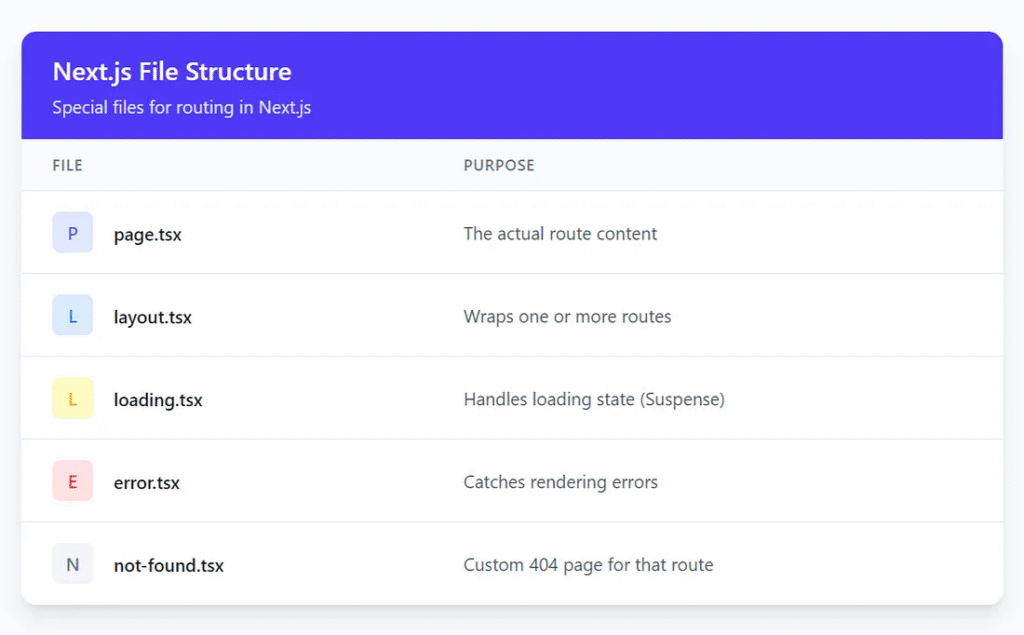
Example: A Dashboard with Nested Routes
Here’s a real-world structure:
/app
  /dashboard
    layout.tsx
    page.tsx
    loading.tsx
    /analytics
      page.tsx
    /settings
      page.tsx
How it works:
layout.tsxWraps all child routes (analytics,settings)page.tsxdefines/dashboarditselfloading.tsxshows a spinner while content loads
This allows you to keep a shared UI (like a sidebar) in layout.tsx. Your users won’t see the sidebar re-render on every route change. Instead, only the content area updates instantly and smoothly.
Client and Server Rendering, Together
One of the most significant changes in the App Router is the separation of server and client components. You decide where rendering happens:
- Use Server Components by default — for faster initial loads and smaller JS bundles.
- Use Client Components (add
'use client'at the top) when you need interactivity.
This gives you complete control. You can fetch data on the server, display content immediately, and hydrate only interactive parts on the client. It’s a performance-first design.
Parallel and Intercepting Routes
Next.js 15 also supports advanced patterns like:
- Parallel routes: Display multiple sections side by side (like tabs or modals).
- Intercepting routes: Load modals or drawers without full page transitions.
With this power, you can build complex UIs (like dashboards, wizards, or live chats) without hacky state workarounds.
Route Groups: Organize Without Affecting URLs
Sometimes, you want to group files for code structure without affecting the URL. Route groups do this. Just wrap the folder name in parentheses:
/app
  /(marketing)
    homepage
      page.tsx
  /(dashboard)
    layout.tsx
    settings
      page.tsx
Even though the folders are organized separately, /homepage and /settings remain flat routes.
Summary
The App Router in Next.js 15 gives you:
- Complete control over nested routes
- Seamless layouts and transitions
- Better performance with server-first rendering
- A scalable structure for apps, large and small
It’s not just routing — it combines layout composition, loading management, and rendering logic.
HeroUI fits perfectly into this model. You can drop components, such as sidebars, modals, or tabs, into layouts or pages. Everything renders efficiently and looks consistent.
Creating Interactive Components
HeroUI components are compatible with both server-side and client-side components. However, for interactivity, you must mark components as client components.
At the top of any interactive file, add:
'use client'
You can then use buttons, toggles, dropdowns, and modals. For example:
"use client";

import {
  Modal,
  Button,
  ModalContent,
  ModalHeader,
  ModalBody,
  useDisclosure,
} from "@heroui/react";

export default function MyModalComponent() {
  const { isOpen, onOpen, onOpenChange } = useDisclosure();

  return (
    <>
      <Button onPress={() => onOpen()}>Open Modal</Button>
      <Modal isOpen={isOpen} placement="top" onOpenChange={onOpenChange}>
        <ModalContent>
          {() => (
            <>
              <ModalHeader className="flex flex-col gap-1">
                Modal Demo
              </ModalHeader>
              <ModalBody>
                <div className="p-6">Hello from the modal!</div>
              </ModalBody>
            </>
          )}
        </ModalContent>
      </Modal>
    </>
  );
}
This modal can live inside its route segment thanks to the App Router’s granular rendering.


Performance Benefits
Both HeroUI and Next.js 15 prioritize performance.
HeroUI is lightweight. It only uses Tailwind classes and doesn’t add extra CSS, which keeps your bundle small.
Next.js 15 enhances loading speed by utilizing streaming and selective hydration. You render server content fast, then hydrate client components gradually. This leads to faster time-to-interactive scores.
You can also cache layouts and shared components. This reduces re-renders and network requests.
Together, these tools help your app easily pass Core Web Vitals.
SEO and Accessibility

How to Optimize HeroUI-Powered Next.js Pages for SEO
Finally
Using HeroUI with Next.js 15’s App Router offers a top-tier developer experience. You get:
- Clean, responsive UI components
- Fast, scalable routing
- Optimized rendering
- SEO and accessibility out of the box
This stack should be your go-to choice for building a modern React app. It balances design, performance, and structure — all in one.
Start small. Explore HeroUI components. Create routes with the App Router. Then iterate.
This article was originally published on Medium.